# Welcome to Rindle
> A SQL database where every query is live
Think Convex, but SQL. Postgres, but live.
Write your application with normal `INSERT`, `UPDATE` and `DELETE` statements, then `subscribe()` to any `SELECT`. Rindle keeps the result current automatically and efficiently.
Rindle is enabled by a Rust port of
[ZVM](https://www.rindle.sh/zvm.md) — the incremental query engine from
[Zero](https://www.rindle.sh/zero.md). Previously, ZVM could only be used as part of Zero. Now it's also available as a standalone database.
## Try It
Rindle is a SQL database where every query is live.
## Features
- **Simple** It’s SQL plus [`subscribe()`](https://www.rindle.sh/typescript-api.md#subscribe). You already know how to use it - database, not framework.
- **Live** Every query is live and incremental by default. Agents get woken on changes, users
see updates without refresh.
- **Fast** First result in [milliseconds](https://www.rindle.sh/performance.md#hydrate), updates in [microseconds](https://www.rindle.sh/performance.md#update). Thousands of live queries and thousands of writes/second on one
core.
- **Tree queries** One trailing [`WITH` clause](https://www.rindle.sh/sql.md#with), and Rindle returns the tree of data your
application actually wants, instead of a flat table to reassemble.
- **Composable** Pure [HTTP server interface](https://www.rindle.sh/http-api.md). Use from [Node](https://www.rindle.sh/typescript-api.md), [React](https://www.rindle.sh/react-api.md), [iOS](https://www.rindle.sh/embedded.md#ios), [whatever](https://www.rindle.sh/embedded.md#rust). Layer [`@rindle/zero`](https://www.rindle.sh/zero.md) or
[TanStack DB](https://www.rindle.sh/tanstack-db.md) on top for instant reads and writes.
- **Cheap** Runs on NVMe and S3, so a database costs nothing when idle and almost nothing when
active.
## Ready to Try?
Head to [Get Started](https://www.rindle.sh/get-started.md). Agents, see [For Agents](https://www.rindle.sh/agents.md).
---
# Get Started
Rindle is in private beta. You need access to the [rocicorp/rindle](https://github.com/rocicorp/rindle) repo to follow these instructions. Email
[aa@roci.dev](mailto:aa@roci.dev?subject=Rindle%20beta%20access) to get access.
## With Agents
Paste a prompt like this into your agent:
Prompt for your agent (Polls):
```text
Build me a live polling app with Rindle. Use the skill https://www.rindle.sh/skill.md.
One page creates a poll with a question and 2–5 options
and gives me a share link. Anyone with the link sees the poll, votes once, and watches the
counts update live, without refreshing. Render the pages on the server so the poll shows up on
first load, then stays live.
```
Prompt for your agent (Chess):
```text
Build me multiplayer chess with Rindle. Use the skill https://www.rindle.sh/skill.md.
I create a game and get a link to send a friend, and we
each see the board update the moment the other moves. The server enforces the rules: it accepts a
move only if it is legal and it is that player's turn, so nobody can cheat by calling the API
directly. I can also choose to play against an AI instead, which moves through the same server
rules. Show check, checkmate, and the move list.
```
Prompt for your agent (Team chat):
```text
Build me a Slack-style team chat with Rindle. Use the skill https://www.rindle.sh/skill.md.
Channels, messages, threads, and emoji reactions,
all updating live, with an unread count on each channel. Private channels and direct messages are
visible only to their members, and the server checks membership on every read and write.
```
Prompt for your agent (Auction):
```text
Build me a live auction site with Rindle. Use the skill https://www.rindle.sh/skill.md.
Sellers list an item with a starting price and an end
time, and bidders watch the price and bid history update live. The server decides which bids
count: a bid must beat the current high bid and arrive before the auction closes, so two people
bidding at once can't both win.
```
Prompt for your agent (Trivia):
```text
Build me a live trivia game with Rindle,
like Kahoot. Use the skill https://www.rindle.sh/skill.md.
A host creates a quiz and shares a join
code, and players join from their phones. The host moves through the questions, everyone answers
against a countdown, and the leaderboard updates live. The server scores the answers, and players
never receive the correct answer before the question closes.
```
Agents can also read these docs as [plain Markdown](https://www.rindle.sh/agents.md).
## By Hand
Install Rindle into your project:
```bash
gh release download dev -R rocicorp/rindle -p install.sh -O - | sh
```
Start the database. It writes its `RINDLE_URL` to `.env`:
```bash
./rindle up
```
Then save this as `app.ts`:
```typescript
import { createClient } from "@rindle/api";
const db = createClient({ url: process.env.RINDLE_URL });
// Applied once, by name. Re-running is a no-op; live queries see the
// new tables. Every table declares a primary key, and your app mints
// the values: there is no AUTOINCREMENT and no rowid.
await db.migrate("0001_init", `
CREATE TABLE issue (
id TEXT PRIMARY KEY,
title TEXT,
closed INTEGER
);
CREATE TABLE comment (
id TEXT PRIMARY KEY,
issue_id TEXT,
body TEXT
);
`);
// Queries are trees -- `WITH` creates a subquery.
type Issue = {
id: string;
title: string;
comments: { body: string }[];
};
const open = await db.query(`
SELECT * FROM issue WHERE closed = 0 ORDER BY id DESC
WITH comments OF comment ON issue_id = id (ORDER BY id DESC LIMIT 10)
`);
// Fires now, then after every commit that affects it.
open.subscribe((rows) => {
console.clear();
console.table(rows.map(({ id, title, comments }) => ({
id, title, comments: comments.length, newest: comments[0]?.body,
})));
});
// Plain SQL writes, addressed by key. Every copy writes to the same
// database, so give each row an id of its own.
const issueId = crypto.randomUUID();
await db.execute({
sql: `INSERT INTO issue (id, title, closed) VALUES (?, ?, ?)`,
params: [issueId, "first", 0],
});
const comments = Array.from({ length: 1000 }, (_, i) => ({
sql: `INSERT INTO comment (id, issue_id, body) VALUES (?, ?, ?)`,
params: [`${issueId}-${String(i).padStart(4, "0")}`, issueId, `comment ${i}`],
}));
// Twenty to a transaction. Fifty commits land; the view never holds
// more than ten.
for (let i = 0; i < comments.length; i += 20) {
await db.batch(comments.slice(i, i + 20));
}
```
Run it in two more terminals, one after the other:
```bash
node --env-file=.env app.ts
```
The first copy's table updates live as the second one writes, and its view never holds more than ten comments.
Next, see the [demos](https://www.rindle.sh/demos.md).
---
# For Agents
> These docs, in plain Markdown
Every page on this site is also plain Markdown, for coding agents and other tools.
- [`/llms.txt`](https://www.rindle.sh/llms.txt) lists every page, with a link to its Markdown.
- [`/llms-full.txt`](https://www.rindle.sh/llms-full.txt) is every page in one file.
- Add `.md` to any page's URL for its Markdown, like
[`/get-started.md`](https://www.rindle.sh/get-started.md). The home page is
[`/index.md`](https://www.rindle.sh/index.md).
## The Skill
To build an app on Rindle, point your agent at the skill:
```text
https://www.rindle.sh/skill.md
```
See [Get Started](https://www.rindle.sh/get-started.md) for prompts that use it.
---
# Why Live Queries
In a normal database, you run a query and get a result. That result is instantly stale. Run a second query and it's stale too, but differently. The two results can disagree with each other, and there's no way to know.
Not a great start for high-quality software, but you accept it — it's just how databases work.
You build something. It has multiple users or agents collaborating. Everyone is changing the same data at the same time, and nobody knows what the others just did. Chaos ensues.
Making this work properly is called "real-time collaboration," but it's really just solving that same inconsistency problem.
You could try to patch it:
- Re-run queries on a timer. That's expensive, and it still leaves gaps.
- Build a WebSocket system to tell the UI when important data changes. Now you get to maintain a whole separate live push system.
Most people decide to live with it. It's just how databases work.
## Why *Do* Databases Work This Way?
Because live queries are hard to do well.
The obvious approach is to re-run each query when its underlying data changes. But the queries worth watching are usually the ones whose data changes most, so you re-run them constantly. That gets expensive.
There are ways to fight this, but they often push the database toward custom query models and APIs, away from standard web architecture.
So most teams pick a traditional database and live with stale results, rather than opt into a walled garden.
## Live Queries, No Walls
Instead of re-running queries, what if we updated a query result precisely as the underlying data changed? This is called [Incremental View Maintenance](https://materializedview.io/p/everything-to-know-incremental-view-maintenance).
IVM engines like [Feldera](https://www.feldera.com/) and [Materialize](https://materialize.com/) exist today, but they're built for analytics: a small number of queries known up front over huge datasets. They trade lots of memory and slow startup for optimal incremental updates.
When we were building [Zero](https://zero.rocicorp.dev/), we needed something like this, but for application workloads. We wanted to sync large numbers of small dynamic queries.
So we built [ZVM](https://www.rindle.sh/zvm.md). It can maintain thousands of small queries on a single core at 1,000 writes per second.
Until now, ZVM was an implementation detail of Zero — you couldn't use it on its own. Rindle factors it out into a standalone database. And because of IVM, we don't need a custom query model: it's just plain [SQL](https://www.rindle.sh/sql.md) with subscriptions. Use it as the basis of a [sync engine](https://www.rindle.sh/zero.md), or just use it as a database.
**Don't like SQL?**
You can use a [typed query builder](https://www.rindle.sh/query-builder.md) too. It's just syntax.
No more stale data. No inconsistent results. Your UI updates when the data does, and collaborators see each other's changes live.
## Bigger Than It Sounds
Live queries sound like a minor feature. They're not. Beyond solving data inconsistency and collaboration, live queries are also the foundation for two of the biggest shifts in software today:
- **Sync.** Efficient live queries are the key to general-purpose sync, because they enable clients to sync only the subset of data they care about. Rindle directly supports [Zero](https://www.rindle.sh/zero.md), but it can just as easily back [TanStack DB](https://www.rindle.sh/tanstack-db.md) or any other sync engine.
- **Agents.** Long-lived agents need to react when data changes. Live queries wake them on the change, instead of having them poll or re-read everything.
## Why Rindle
We built ZVM because we needed it for Zero. But live queries shouldn't be a special feature of exotic databases. They should just be how data works.
[Get Started](https://www.rindle.sh/get-started.md)
---
# Performance
Rindle's goal is a query system that is great at both halves of a live query: getting the first
result, and keeping it up to date. We track four things: time to first result, time for each
update, how update time grows with the number of queries, and how memory grows with the number of
queries.
*All benchmarks run on Chinook ×30 (105k tracks), in-process, on the same data. Rindle in sink
mode over its paged store vs. SQLite re-running the query, with matching index keys and full-row
index coverage on both sides. MacBook Pro M5 Pro. Source:
[triangle bench](https://github.com/rocicorp/rindle/blob/main/rust/rindle-triangle-bench); each
chart names its raw results file.*
These runs use covering indexes. New local indexes default to keys alone, which saves storage
and secondary writes but adds primary lookups. The [SQL guide](https://www.rindle.sh/sql.md#schema-changes) shows how to
request covering for a read-heavy query.
## Hydrate
Hydrate is the time to create a live query and return its first result. A live query does more
work for its first result than a classic query, because it has to do some setup to keep the result
current later. On Page, Top 50, Nested and Full join, the two systems return their first result
within about 20% of each other in this run. SQLite is ahead on Page, Top 50 and Full join; Rindle
is slightly ahead on Nested. EXISTS costs Rindle more to hydrate, while keeping it current is much
cheaper per write, as the [Update](#update) tab shows.
| Query | SQLite | Rindle | Rindle vs. SQLite |
| --- | --- | --- | --- |
| Page: one genre's 100 longest tracks | 12.9 µs | 15.2 µs | 1.2× slower |
| Top 50: top 50 tracks by length | 6.58 µs | 7.92 µs | 1.2× slower |
| Nested: 10 albums, 10 newest tracks each | 23.6 µs | 21 µs | 1.1× faster |
| Full join: all albums with all their tracks | 10.1 ms | 10.9 ms | 1.1× slower |
| EXISTS: 100 newest albums with a track in a genre | 42.1 µs | 229 µs | 5.5× slower |
Each query has its own scale, so compare the two columns within a query, not across queries.
Measured 2026-10-23 ([`2026-10-23-apple-m5-pro-fair.txt`](https://github.com/rocicorp/rindle/blob/main/rust/rindle-triangle-bench/results/2026-10-23-apple-m5-pro-fair.txt)).
## Update
Update is the time to get a new result after data changes. A classic database has to re-run the
query from scratch, while Rindle only does work in proportion to the size of the edit. The
advantage depends on how expensive the original query was.
| Query | SQLite re-run | Rindle update | Rindle vs. SQLite re-run |
| --- | --- | --- | --- |
| Top 50: top 50 tracks by length | 9.15 µs | 2.04 µs | 4.5× faster |
| Nested: 10 albums, 10 newest tracks each | 20.8 µs | 2.03 µs | 10× faster |
| EXISTS: 100 newest albums with a track in a genre | 43.9 µs | 2.06 µs | 21× faster |
| Page: one genre's 100 longest tracks | 15 µs | 1.98 µs | 7.6× faster |
| Full join: all albums with all their tracks | 10.3 ms | 2.52 µs | 4,100× faster |
Each query has its own scale. Measured 2026-10-23 ([`2026-10-23-apple-m5-pro-fair.txt`](https://github.com/rocicorp/rindle/blob/main/rust/rindle-triangle-bench/results/2026-10-23-apple-m5-pro-fair.txt)).
### Polling
Most apps want to know when a query's result changes so they can do something in response.
Without live queries, these apps often resort to polling. With Rindle, polling is unnecessary:
Rindle does no work while the data is unchanged, and tells the app the moment a new result is
ready.
This table models what polling costs, in CPU and in staleness, for a given poll rate and rate of
change. Move the sliders to try different settings.
| Query | CPU/s SQLite | CPU/s Rindle | Rindle | Staleness SQLite | Staleness Rindle | Rindle |
| --- | --- | --- | --- | --- | --- | --- |
| top 50 tracks by length | 1.83 µs | 0.034 µs | 54× cheaper | 2.5 s | 2.04 µs | 1,200,000× fresher |
| one genre's 100 longest tracks | 3 µs | 0.033 µs | 91× cheaper | 2.5 s | 1.98 µs | 1,300,000× fresher |
| 10 albums, 10 newest tracks each | 4.16 µs | 0.034 µs | 120× cheaper | 2.5 s | 2.03 µs | 1,200,000× fresher |
| 100 newest albums with a track in a genre | 8.77 µs | 0.034 µs | 260× cheaper | 2.5 s | 2.06 µs | 1,200,000× fresher |
| all albums with all their tracks | 2.05 ms | 0.042 µs | 49,000× cheaper | 2.51 s | 2.52 µs | 990,000× fresher |
Polling CPU is the re-run time divided by the poll interval, paid whether or not anything
changed. Rindle CPU is the update time per change. Staleness is the average time from a write to
the new result. For 1,000 people watching, polling multiplies by 1,000; Rindle doesn't, which is
the Fan-out tab.
## Fan-Out
In most apps, one write can affect many live queries. We call this *fan-out*. When a query filters
on a specific column and value, like `AlbumId = 7`, Rindle indexes the query by that value and only
checks it when a write touches a row with that value. Every other query never sees the write at
all.
*Diagram: A Track insert with AlbumId 7, GenreId 2 (Jazz) and MediaTypeId 1 (audio) reaches only the live query filtering on AlbumId = 7; the queries filtering on GenreId = 1 (Rock) and MediaTypeId = 3 (video) are skipped.*
This works for `column = value` filters. Other filters, like ranges, are checked against
each write.
As the number of live queries grows, the cost to re-run grows linearly, but Rindle's cost grows far
more slowly.
| Live queries | SQLite, re-run all | Rindle, per write | Rindle vs. SQLite re-run |
| --- | --- | --- | --- |
| 1 | 14.9 µs | 2.05 µs | 7.2× faster |
| 8 | 63.4 µs | 2.36 µs | 27× faster |
| 64 | 698 µs | 2.35 µs | 300× faster |
| 512 | 6.01 ms | 5.71 µs | 1,100× faster |
| 1,024 | 12.1 ms | 12.2 µs | 990× faster |
Each live query is a genre's or an album's 100 longest tracks, alternating. Each write is a
new track. Measured 2026-10-23 (the `fanout_mixed` cell, [`2026-10-23-apple-m5-pro-fair.txt`](https://github.com/rocicorp/rindle/blob/main/rust/rindle-triangle-bench/results/2026-10-23-apple-m5-pro-fair.txt)).
### Query Families
Many live queries are actually the same query with a single different filter value: each person's
own issues, each team's own channel, etc. Rindle recognizes these and collapses them into a single
*query family*.
*Diagram: Three live queries, Album WHERE ArtistId = 1 (AC/DC), 50 (Metallica) and 90 (Iron Maiden), each with its 20 newest albums and 5 newest tracks per album, run as one pipeline over Album WHERE ArtistId = ? with one partition per artist. A new track on a Metallica album reaches only Metallica's partition.*
A new track on a Metallica album reaches only Metallica's partition.
Sharing a pipeline makes each write cheap, even when it lands on a related table, like a new track,
where the index can't tell whose list it belongs to. It also [saves memory](#memory).
| People watching | SQLite, re-run all | Rindle, per write | Rindle vs. SQLite re-run |
| --- | --- | --- | --- |
| 100 | 1.31 ms | 5.09 µs | 260× faster |
| 1,000 | 12.7 ms | 5.53 µs | 2,300× faster |
| 5,000 | 63.7 ms | 5.59 µs | 11,000× faster |
Each person watches their artist's 20 newest albums, each with its 5 newest tracks. Each
write adds a track to one watched album, so one person's result changes. Measured 2026-10-23 (the
`family` cell, [`2026-10-23-apple-m5-pro-fair-family.txt`](https://github.com/rocicorp/rindle/blob/main/rust/rindle-triangle-bench/results/2026-10-23-apple-m5-pro-fair-family.txt)).
## Memory
An incremental engine has to remember something about each live query so it can update it later.
If that memory grows with the size of the tables, live queries get expensive fast.
Rindle collapses large numbers of active queries into a small number of query *families*, reducing
memory usage to a small constant factor of maintained rows.
| Live queries | Rindle memory | Per query | Per maintained row |
| --- | --- | --- | --- |
| 100 | 160 KB | 1.6 KB | 195 B |
| 1,000 | 1.35 MB | 1.35 KB | 182 B |
| 5,000 | 6.64 MB | 1.33 KB | 181 B |
Each query is an album's 10 longest tracks. Engine memory only, not counting the results
sent to clients or the database itself. Measured 2026-10-23 (the `family_page10` cell,
[`2026-10-23-apple-m5-pro-fair-family.txt`](https://github.com/rocicorp/rindle/blob/main/rust/rindle-triangle-bench/results/2026-10-23-apple-m5-pro-fair-family.txt)).
---
# Demos
## Scale
Thousands of open queries. 1k writes/second. 1 GB of data. 1 vCPU.
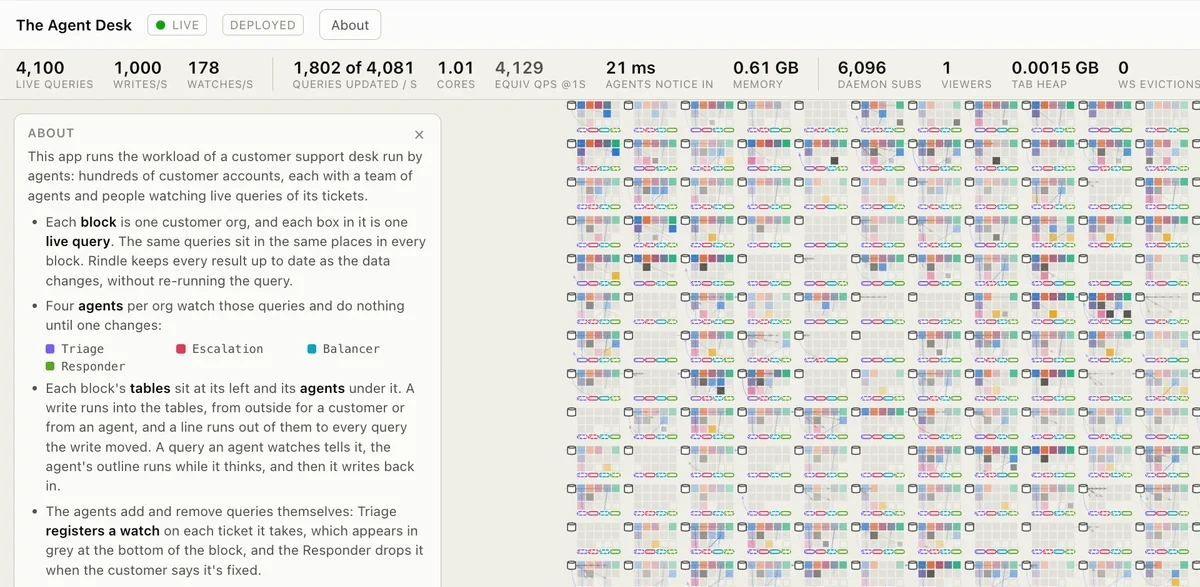
A support desk, read as live queries: one zoomable plane, a block of cards per org, and a card
per query — tiles at a distance, real rows and real deltas up close. Customers write in, and
**agents** watching the inbox, the escalation searches and each team's load react to what their
own live queries tell them, registering a watch on every ticket they pick up. Behind it are the
tiers a hosted deployment has: one `rindled` in authority posture holding the data and every
pipeline, and a stateless API server that is the only way in to it.
Running live, with the same page on two hosts in front of one shared backend:
- Vercel: [https://rindle-scale-demo.preview.rocicorp.dev/](https://rindle-scale-demo.preview.rocicorp.dev/)
- Cloudflare: [https://rindle-scale-demo.replicache.workers.dev/](https://rindle-scale-demo.replicache.workers.dev/)
Try it locally:
```bash
pnpm install
# Builds the server and seeds the data on first run.
# Then open http://127.0.0.1:7801
pnpm --filter @rindle/agent-desk dev
```
Its simpler sibling, the same tiers with no agents and a wasm engine in every tab, is
`pnpm --filter @rindle/deployed-scale-demo dev` on `http://127.0.0.1:7800` — it needs
`pnpm run build:wasm` first, because that board holds its own engine.
## Full-Stack Sync
The headline demo from [Zero](https://zerosync.dev), rewritten using the [Rindle adapter](https://www.rindle.sh/zero.md).
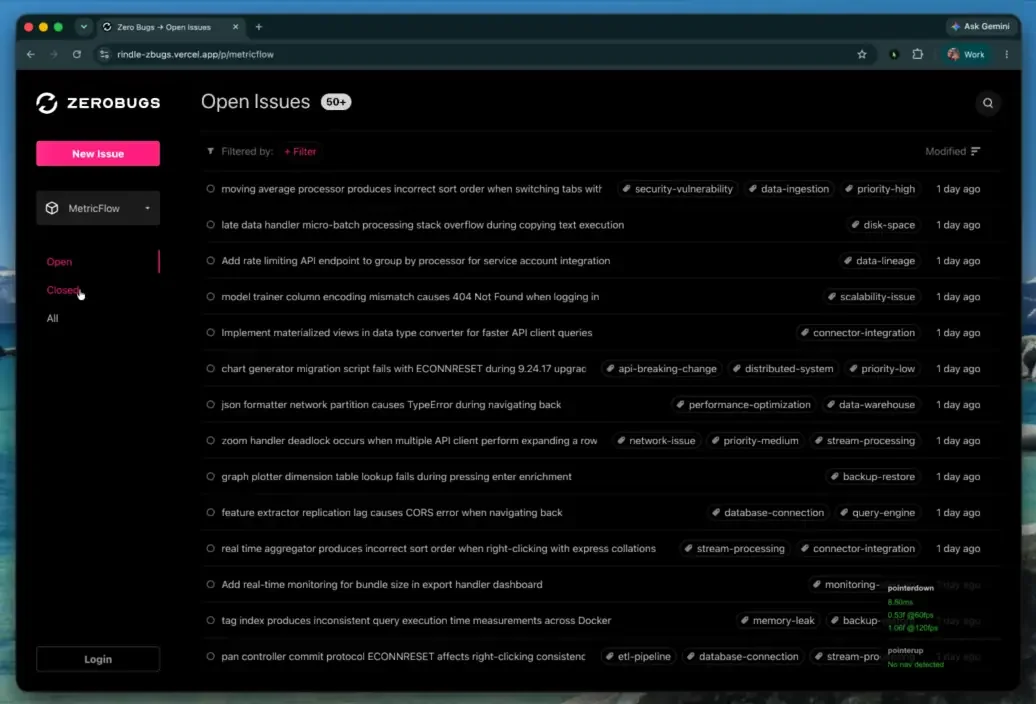
Try it locally (needs Docker for Postgres; this config still uses a Postgres upstream):
```bash
pnpm install
pnpm --filter @rindle/zbugs build:runtime # builds the Rindle binaries
# Starts Postgres, the Rindle gateway + follower, and Vite on :5173
cd apps/zbugs && pnpm dev
# Seed it, using the port `pnpm dev` printed
ZERO_UPSTREAM_DB='postgres://rindle:rindle@127.0.0.1:/app' \
pnpm db-seed
```
## Client-Side Live Queries
The core Rindle database is a small library, gzip-compressed. It runs on the web via wasm, in
Node natively, and in any Rust program as a crate. It provides a full relational, embedded
database with live queries that answer and update in microseconds. Hook it to the Rindle server
for a full, opinionated stack, or to your own server however you want.
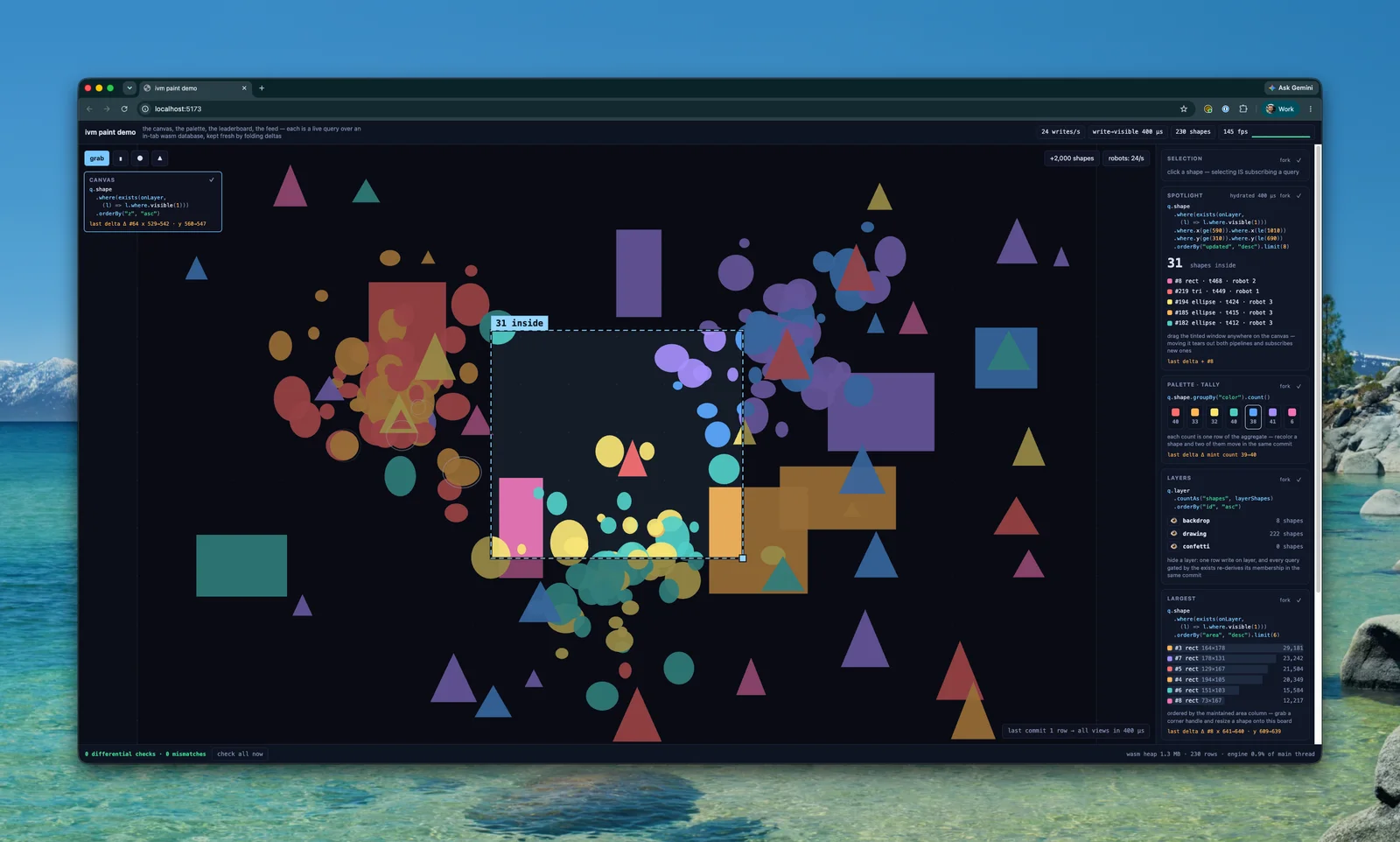
Try it locally: the demo lives in its own repo,
[rocicorp/wasm-canvas-demo](https://github.com/rocicorp/wasm-canvas-demo).
## Streaming Queries Against Any Change Source
Put Rindle downstream of your existing database, Kafka stream, whatever. Delete your websockets,
webhooks, and API. Agents can directly watch any relational query they want, efficiently. Rindle
becomes shared infra within your org that agents use to watch changing data.
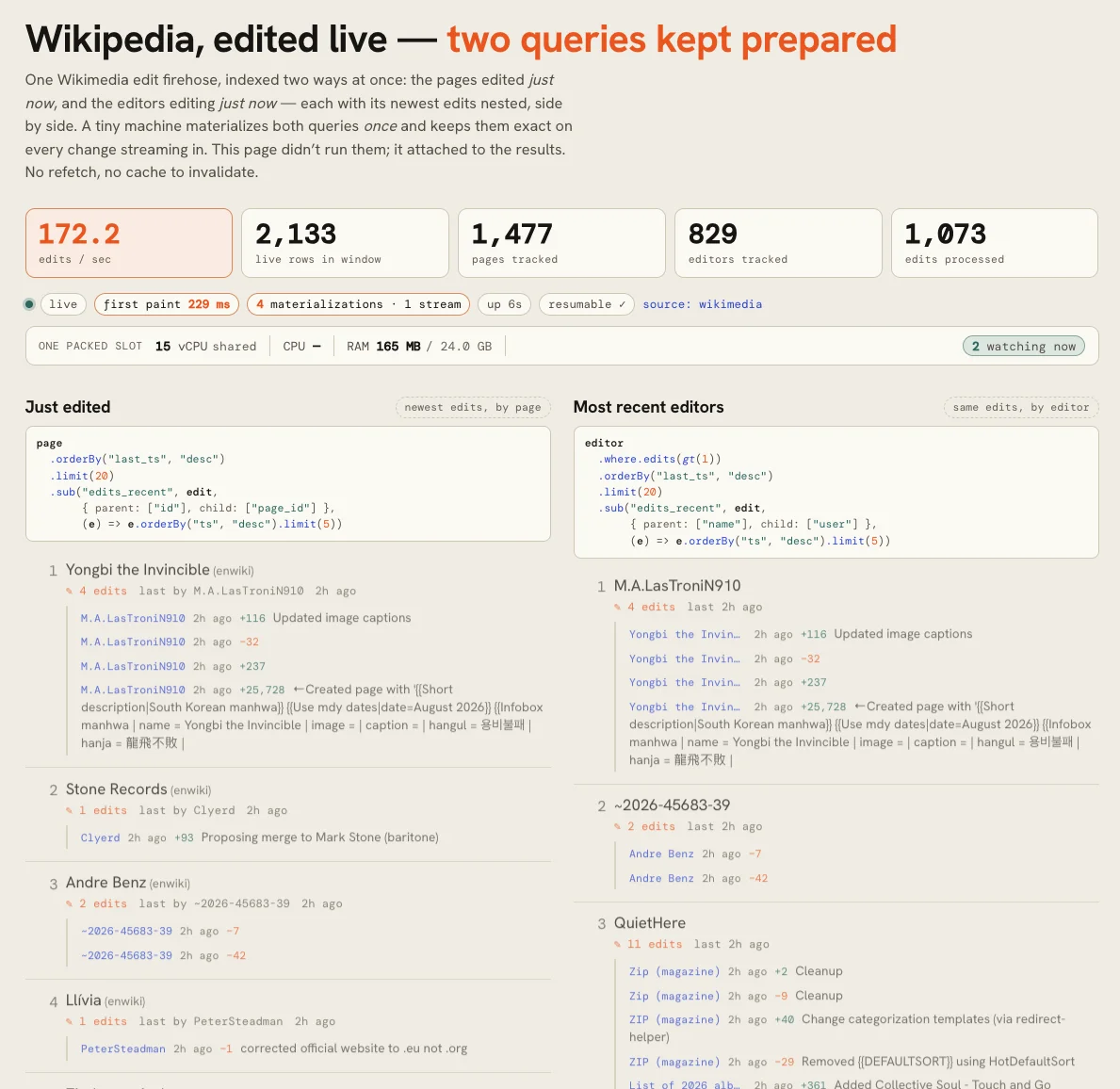
Rindle sits downstream of Wikimedia's live edit firehose. Every browser that opens attaches to
the same maintained boards, so N readers cost one pipeline, not N.
Try it locally: the data tier in one terminal, the UI in another.
```bash
# Boots a rindled authority with two pinned boards and ingests the live Wikimedia feed
cd apps/wiki-demo && pnpm dev
cd apps/wiki-demo && pnpm dev # the data tier; its browser UI retired with product-page
```
---
# Overview
Rindle is a new, from-scratch relational database built to support efficient live queries from
the ground up. It grew out of our work on [Zero](https://www.rindle.sh/zero.md).
## The Promise
```text
view-after-write == fresh-query
```
The changes a subscriber receives, applied in order, always equal running the query again from
scratch. Everything else in Rindle is built to keep that true. [Consistency](https://www.rindle.sh/consistency.md) has the
full list of guarantees.
## Query Languages
Rindle speaks a subset of SQL with some convenience extensions. It can also receive raw ASTs from
clients, enabling native support for [typed query builders](https://www.rindle.sh/query-builder.md).
Writes are SQL statements, sent one at a time, in a batch, or in an interactive
[transaction](https://www.rindle.sh/consistency.md#isolation). Schema changes are via a small native
[migration system](https://www.rindle.sh/sql.md#schema-changes).
Rindle does not currently support traditional joins, but does have native support for
[tree queries](https://www.rindle.sh/sql.md#with) via the `WITH` statement which are often more useful.
## Where It Runs
- **[Cloud Rindle](https://www.rindle.sh/cloud.md)**: hosted by us.
- **[Self-hosted](https://www.rindle.sh/self-hosted.md)**: one binary on your own machines.
- **[Embedded](https://www.rindle.sh/embedded.md)**: in your process, including the browser.
- **[Bring your own database](https://www.rindle.sh/byodb.md)**: live queries over Postgres or another source of truth.
## Shape
A small app runs one server which handles subscriptions and writes.
To scale, Rindle splits into a leader, which takes every write, and any number of read followers,
which run the live queries. Your app sees the same URL and the same API either way.
[Self-Hosted](https://www.rindle.sh/self-hosted.md) shows the layout.
## Interface
Rindle's interface is [HTTP](https://www.rindle.sh/http-api.md). Your server sends queries and writes, and creates
subscriptions; each browser or client reads its own stream of changes directly.
[Architecture](https://www.rindle.sh/architecture.md) shows how that fits into an app, and the
[client libraries](https://www.rindle.sh/typescript-api.md) wrap it.
---
# ZVM
> Rindle's incremental query engine
ZVM (Zero View Maintenance) is the query engine at the heart of Rindle. It started as the engine
behind [Zero](https://www.rindle.sh/zero.md), where it has run in production for two years, and Rindle is a Rust port of
it.
## What It Does
A normal database answers a query once. The moment anything changes, the answer is stale, and the
application has to ask again.
ZVM answers once and then keeps the answer current. For every write to the tables a query reads,
it works out what changed in the result: this row entered, that one left, this field is
different, a comment appeared under this issue. It does this by precisely calculating the
changes needed to the previous result. It doesn't re-run queries and diff.
ZVM is inspired by incremental query engines like
[Differential Dataflow](https://github.com/TimelyDataflow/differential-dataflow),
[DBSP](https://arxiv.org/abs/2203.16684), and [Noria](https://github.com/mit-pdos/noria), but
blends in features from traditional query engines to better balance hydrate and update
performance.
## Why We Built It
Previous incremental query engines are built to provide maximum update speed and throughput, but
trade-off time to first result. They are designed for OLAP style applications where there are a small
number of very-long running queries over huge datasets.
When we were working on Zero, we needed efficient live queries but for an OLTP use case — large
numbers of dynamic, small queries over moderate datasets.
## How It Works
Differential dataflow and DBSP work by creating a dataflow pipeline of *operators*. Data flows
through these operators unidirectionally, from top down.
*Diagram: A dataflow pipeline. Two tables feed a join, which feeds a limit, which feeds the result. Data only flows downward. The join keeps a copy of both inputs, and the limit keeps every row that could enter the top 10.*
This has a few immediate challenges for OLTP applications:
1. The entire input dataset needs to flow through the pipeline to compute the first result.
2. Join and limit operators require a huge amount of state to be able to lookup data needed for
their work, since there is no other place they could get it.
ZVM also builds a pipeline, but in ZVM data can flow both ways. Clients can *pull* data from the
bottom-up to hydrate initial results. The system can also *push* data from top-down when data
sources change.
*Diagram: A ZVM pipeline. The same tables, join and limit. Changes are pushed down from the tables. Rows are pulled up from the tables when a result is needed, so the join keeps no copy and the limit stops after about ten rows.*
This means that just like in a normal database, ZVM can stop early on limited queries. If you
request 10 rows, ZVM will usually read some small constant factor more than 10 rows.
Also, since ZVM inherently includes the ability to fetch, it can use this in the join and limit
operators to avoid storing state. Instead that data can be looked up from the database itself
when needed.
Stopping early means that Rindle can support short-lived, dynamic live queries. And using very
small amounts of memory in the operators means that Rindle can support many such queries.
---
# Consistency
Transactions are serializable by default. Live queries only ever show committed data, and their
results always match a fresh run of the query.
## Live Queries
- **Every update is a committed state.** A subscriber never sees a partial transaction or a write
that later rolls back.
- **Updates match a fresh query.** Applying the changes you receive, in order, gives exactly the
result of running the query from scratch at that point.
- **Updates move forward.** A subscription never goes back to an older state. Rindle may combine
several commits into one update, so you can skip intermediate states, but you never see a state
that didn't exist.
- **An open transaction is invisible.** Its writes appear in live queries when it commits, all at
once.
## Isolation
| Level | Guarantee | Default for |
|---|---|---|
| `serializable` | The result is the same as if transactions ran one at a time, in some order. | Read-write transactions |
| `snapshot` | Each transaction reads one consistent snapshot, from when it began, and two transactions conflict only if they write the same row. A rule that spans rows, such as "at least one admin", can be broken by two concurrent transactions (write skew). | Read-only transactions |
Single statements and batches are each one transaction. Interactive transactions choose a level
when they begin ([`POST /db/transactions`](https://www.rindle.sh/http-api.md#transactions)).
Transactions never wait for each other. Each one reads its own snapshot, and Rindle checks it at
commit. If a concurrent commit means it can't be serialized, the commit fails with
`409 TRANSACTION_CONFLICT` and nothing is written. Run the whole transaction again from its first
statement. Rindle doesn't retry for you, because only your code knows whether the transaction
still makes sense.
Within a transaction you see your own writes. Outside it, a read sees the latest committed state.
## Durability
A write is committed when its request returns. What survives depends on what fails:
| Failure | Default (`commitSync: "normal"`) | `commitSync: "full"` |
|---|---|---|
| Process crash | Nothing lost | Nothing lost |
| Power loss | Commits since the last checkpoint may be lost | Nothing lost |
| Machine lost | Up to the last 60 seconds of commits may be lost | Up to the last 60 seconds of commits may be lost |
The database is never left corrupt or half-applied. A recovered database is always some committed
state.
Rindle ships its log to object storage continuously and can restore to any commit in the
retention window. Closing the 60-second window for a lost machine is the main remaining work; see
[Status](https://www.rindle.sh/status.md).
## Followers
All writes and SQL reads go to the leader, so they always see the latest commit. Live queries run
on followers, which apply the leader's commits in order, usually within milliseconds. A
subscription reflects a commit once its follower has applied it.
---
# Limits
## Scale
- **One writer.** Every write goes through one leader. Followers add capacity for reads and live
queries, not for writes.
## SQL
- No SQL `JOIN` in live queries; use a [`WITH`](https://www.rindle.sh/sql.md#with) clause instead.
- No `GROUP BY`, `HAVING` or top-level aggregates such as `SELECT count(*)`.
- Writes compare columns with values: no expressions in `SET`, no `CASE`, no `RETURNING`.
- Every table needs a primary key.
[SQL](https://www.rindle.sh/sql.md) lists what is supported and what each refusal suggests instead.
## Transactions
| Limit | Default | When exceeded |
|---|---|---|
| Idle time between operations | 5 s | Rolls back, `410 TRANSACTION_CLOSED` |
| Total time from `begin` | 30 s | Rolls back, `410 TRANSACTION_CLOSED` |
| Open transactions | 1,024 | `503` |
| Unanswered write requests | 32 | `503` |
## Subscriptions
| Limit | Default | When exceeded |
|---|---|---|
| Live queries per client | 256 | `429 too-many-queries` |
| Stream token lifetime | 30 s, single use | Refused; get a new one |
## Durability
Losing the leader's machine can lose up to the last 60 seconds of commits. A process crash loses
nothing. [Consistency](https://www.rindle.sh/consistency.md#durability) has the details, and [Status](https://www.rindle.sh/status.md) the plan to
close it.
---
# Status
> Beta, but getting pretty good
Rindle is an LLM-assisted port of Zero's query engine from TypeScript to Rust. Zero has been in
production for two years, and it was already a database in all but name, with storage, indexes, a
query optimizer, and replicas. What it lacked was authority: Zero always follows some other
upstream database. Rindle adds that, so it can be the source of truth itself.
Correctness is tested in depth. Rindle runs its own unit and integration suite and Zero's original
one, but the main defense is a single contract: the changes a subscriber receives, applied in
order, always equal running the query from scratch. A SQLite-based oracle and a differential
fuzzer check that contract across generated queries, and regular runs add deeper fuzz sweeps and
TLA+ model checks of the replication protocols.
## What's Left: The Last Sixty Seconds of Durability
Most of the authority work is built: one binary that runs as a leader or a follower, a
copy-on-write paged store whose commits are shadow-paged and group-committed, a redo log that
read followers replicate from, lineage fencing so a replaced leader can't write, and backup and
point-in-time restore to S3.
The main thing that's left is the last sixty seconds of durability. As a replica, Zero never
needed it: it has a single writer, the replication stream, and if it exits before a write is
durable, it picks the write up again from the stream on reboot. Rindle's leader has no stream to
fall back on. It ships its log to S3 every 60 seconds, so a machine lost inside that window
loses acknowledged writes. A process crash loses nothing, because the writes are on local disk.
But a lost machine can, and that is not acceptable for a database.
Fixing this is a well-understood problem with at least two well-known solutions: group-commit the
log tail to the object store before acknowledging, like Turso, or hold the tail in a small
replicated hot store, like Neon.
---
# Architecture
This page shows how Rindle fits into an application at the simplest level: plain HTTP endpoints on
your server, and one stream per client. Client libraries and frameworks usually build their own
conventions on top of this structure, for example [React](https://www.rindle.sh/react-api.md).
Rindle fits into your architecture very similarly to any traditional database. Reads and writes are
mediated by your server, which enforces business logic and permissions. Untrusted clients do not
have direct access to read or write data in Rindle.
*Diagram: Queries and writes go through your API server; the stream comes straight from Rindle. The client calls your API server: one route gets a stream token, one adds and removes the page's queries, and the others are ordinary endpoints, such as one that shares a note. Your API server calls the Rindle server for the stream token, to apply query ops and to execute writes. The client opens its stream straight from the Rindle server with the stream token, and the stream flows from Rindle to the client.*
The only thing different about Rindle is that query results don't come back on the request that
made the query. Instead, queries are done by adding *subscriptions*, and all subscription results
flow back to the client over one long-lived
[WebSocket](https://developer.mozilla.org/en-US/docs/Web/API/WebSockets_API).
## How It Works
*Diagram: A stream, a query and a write, step by step. Step 1: the client asks your server for a stream token; your server checks the user and calls /db/stream-auth, and returns Rindle's stream token to the client. Step 2: the client opens /db/stream on Rindle with the stream token. Step 3: the client asks your server for data; your server checks the user, picks the SQL and calls /db/subscribe, and answers that it was accepted; results arrive on the stream. Step 4: the client calls your server to create a note; your server calls /db/execute with an ownership check, and every affected subscription updates on the stream, for every user.*
1. **Get a stream token.** The client calls an endpoint on your server, which checks the user as
normal and calls Rindle's `/db/stream-auth`. The returned
[stream token](https://www.rindle.sh/http-api.md#stream-tokens) must be sent with all of the client's subscribe and
stream calls to Rindle. To avoid the extra round trip, you can call `/db/stream-auth` on the
server and embed the resulting stream token into the page using SSR.
2. **Open a stream.** The client opens a WebSocket to `/db/stream` on Rindle with the stream token.
Periodically, the client calls your endpoint again to get a fresh stream token from
[`/db/stream-auth`](https://www.rindle.sh/http-api.md#stream-auth), then sends this stream token upstream on the
socket to extend its expiry. Without this extension, Rindle closes the stream after
[5 minutes by default](https://www.rindle.sh/http-api.md#stream). Because only your server can get stream tokens, users
who lose access to data get disconnected quickly. Use
[`/db/stream-deauth`](https://www.rindle.sh/http-api.md#stream-deauth) to disconnect a user immediately.
3. **Subscribe to queries.** The client calls APIs on your server. Your server authenticates the
user as normal, then calls Rindle's `/db/subscribe` to add or remove subscriptions for that
client. The results arrive on the stream, and every subscription updates together, in one
transaction.
4. **Write data.** The client calls your server's APIs like any other web app; your
server authenticates the user and calls Rindle's `/db/execute`. Every subscription the write affects
updates on the stream atomically, for every user who can see it. Note there is nothing special
about these writes. Any change to the Rindle database from any source updates every subscription
it affects.
## Server Setup
Connect to Rindle using its URL and API token:
```http
# No connection to set up. Every request to $RINDLE_URL carries:
Authorization: Bearer $RINDLE_API_TOKEN
```
```ts
import { createClient } from "@rindle/api";
const db = createClient({
url: process.env.RINDLE_URL,
apiToken: process.env.RINDLE_API_TOKEN,
});
```
In development (with `rindle up`) the api token isn't needed.
A Rindle http connection is not expensive. You can create one per route, or share one globally.
Whatever you like. Note that the [stream](https://www.rindle.sh/http-api.md#stream) API does hold a WebSocket open, but servers don't
typically call that.
### Stream Auth
Add an endpoint that checks the user and gets a stream token for that client from Rindle:
```http
POST $RINDLE_URL/db/stream-auth
Authorization: Bearer $RINDLE_API_TOKEN
Rindle-Client: c_7f3k2q
Rindle-User: user_42
HTTP/1.1 200 OK
Content-Type: application/json
{ "streamToken": "eyJjIjoiY183ZjNrMnEi…" }
```
```ts
// POST /api/rindle/auth
export async function POST(request: Request) {
const user = await getUser(request); // your own auth
if (!user) return new Response("Unauthorized", { status: 401 });
const { clientID, streamToken } = await request.json();
const result = await db.authorizeStream({
clientID,
userID: user.id,
streamToken,
});
return Response.json(result);
}
```
Return the stream token to the client. The client calls this endpoint whenever it needs a new stream
token: before its first subscribe and stream, and every few minutes to keep the stream open.
`streamToken` is the client's previous stream token, once it has one.
The first call is a round trip before the page can subscribe or open its stream. To avoid it, call
`authorizeStream` while server-rendering the page and put the stream token in the HTML.
### Reads
Clients read data by posting to an ordinary endpoint. The endpoint authenticates the user as
normal, then picks the SQL to subscribe to:
```http
POST $RINDLE_URL/db/subscribe
Authorization: Bearer $RINDLE_API_TOKEN
Rindle-Client: c_7f3k2q
Rindle-User: user_42
Rindle-Stream-Token: eyJjIjoiY183ZjNrMnEi…
Content-Type: application/json
{
"ops": [
{
"op": "add",
"id": 7,
"sql":
"SELECT id, title FROM note WHERE owner_id = ? ORDER BY id",
"params": ["user_42"]
}
]
}
HTTP/1.1 200 OK
Content-Type: application/json
{ "ops": [{ "id": 7, "status": "ok" }] }
```
```ts
// POST /api/note/list
export async function POST(request: Request) {
const user = await getUser(request); // your own auth
if (!user) return new Response("Unauthorized", { status: 401 });
const { clientID, subscriptionID, streamToken } = await request.json();
// See also unsubscribe() and subscribeOps()
const result = await db.subscribe({
clientID,
subscriptionID,
userID: user.id,
streamToken,
sql: "SELECT id, title FROM note WHERE owner_id = ? ORDER BY id",
params: [user.id],
});
return Response.json(result);
}
```
- `clientID` identifies the *client* we're adding the subscription to. Subscriptions are owned by
clients, not streams because streams are short-lived. When one stream ends, the client creates a
new one and picks up without gaps.
- `subscriptionID` is a per-client integer chosen by the client.
- `userID` is optional. When given, Rindle ties the client to that user: a call naming the client
with a different user is refused, and your server can disconnect all of a user's clients at once
with `/db/stream-deauth`.
- `streamToken` is the client's latest stream token. Rindle uses it to reach the server that holds
the client's subscriptions.
### Writes
Writes are ordinary endpoints too. Authenticate the user, then run SQL against Rindle as normal:
```http
POST $RINDLE_URL/db/execute
Authorization: Bearer $RINDLE_API_TOKEN
Content-Type: application/json
{
"sql": "INSERT INTO note (owner_id, title) VALUES (?, ?)",
"params": ["user_42", "Groceries"]
}
HTTP/1.1 200 OK
Content-Type: application/json
{ "rowsAffected": 1, "lastInsertRowid": 12 }
```
```ts
// POST /api/note/create
export async function POST(request: Request) {
const user = await getUser(request); // your own auth
if (!user) return new Response("Unauthorized", { status: 401 });
const { title } = await request.json();
await db.execute({
sql: "INSERT INTO note (owner_id, title) VALUES (?, ?)",
params: [user.id, title],
});
return new Response(null, { status: 204 });
}
```
Every matching subscription is automatically updated, and changes are sent to the affected clients'
streams.
## Permissions
You already know how to implement permissions – it's just your API server picking the SQL for
a query. There is no separate permission system, and no need for one. Your endpoint uses ordinary
business logic to decide which query to run, or to refuse one:
```ts
// POST /api/note/list
const { sql, params } = user.isAdmin
? { sql: "SELECT id, title FROM note ORDER BY id", params: [] }
: {
sql: "SELECT id, title FROM note WHERE owner_id = ? ORDER BY id",
params: [user.id],
};
const result = await db.subscribe({
clientID,
subscriptionID,
userID: user.id,
streamToken,
sql,
params,
});
return Response.json(result);
```
## Permission Examples
| Rule | SQL |
|---|---|
| Only your own rows | `WHERE owner_id = ?` |
| Rows shared with you | `OR EXISTS (SELECT 1 FROM share WHERE share.note_id = note.id AND share.user_id = ?)` |
| Rows in your teams | `WHERE EXISTS (SELECT 1 FROM member WHERE member.team_id = doc.team_id AND member.user_id = ?)` |
| Hide a column | Select only the columns this user may see: `SELECT id, title FROM …`, not `SELECT *`. Only the selected columns reach the browser. |
| Different rules per role | Pick a different query in your endpoint: `if (user.isAdmin) …` |
Always pass the user's id as a parameter from your server. Never take it from the request body or
URL.
## Permissions Are Live
Note that because permissions in Rindle are based on live queries, the resulting permission
logic is also live. When a note is unshared, it disappears from the other user's open page right away, because their query no longer matches it.
The same holds for anything the rule can see: team membership, a role column, an `archived` flag.
Some rules live outside your data: a user logs out, gets banned, or has a role your auth provider
holds. For those, end the user's streams:
```ts
await db.deauthorizeStream({ userID: user.id });
```
That ends every stream for that user, in every tab (Rindle's [`/db/stream-deauth`](https://www.rindle.sh/http-api.md#stream-deauth)). Their
clients ask your auth endpoint for a new stream token, your server checks them again, and anything
they are no longer allowed to see stays gone. `db.deauthorizeStream({ userID, clientID })` ends
one client's stream.
---
# Cloud Rindle
The easiest way to deploy Rindle is with Cloud Rindle.
## Deploy
Sign in. This opens a browser to confirm a code:
```bash
./rindle login
```
Then, from your project directory:
```bash
./rindle deploy
```
It creates the database, waits until it's ready, and prints how to reach it:
```bash
RINDLE_URL=https://app-7f3k2q.rindle.cloud
RINDLE_API_TOKEN=rdt_…
```
Set both in your server's environment, wherever it runs. Keep the token server-side.
Running `deploy` again updates the same database. The project is bound to it in
`.rindle/cloud.json`, which holds no secrets and is safe to commit.
## Pricing
See [rindle.sh/pricing](https://rindle.sh/pricing).
## Regions
Databases run in Gravelines, France. More regions are coming.
## Other Commands
| Command | Does |
|---|---|
| `./rindle whoami` | Shows the signed-in account |
| `./rindle logout` | Signs out and deletes the saved credential |
| `./rindle link ` | Binds the project to a database created in the dashboard |
| `./rindle migrate apply --cloud` | Applies `migrations/*.sql` |
Logs, metrics, resizing, and deleting are in the dashboard at
[cloud.rindle.sh](https://cloud.rindle.sh).
---
# Self-Hosted
> How Rindle runs server-side, and how it scales
> **Coming soon.** Rindle is not available to self-host yet.
Rindle is one binary, `rindle`. On a single machine it is one server process and one database
file. To scale, it splits into a leader and any number of read followers, the way Postgres scales
reads with replicas, except that followers also run the live queries.
The leader and the followers are **the same process in two postures**, declared in config:
`"posture": "authority"` owns its store and serves writes, and the default, `"follower"`, tails
one upstream and answers every write route with a `409` naming it. Posture is declared rather
than inferred, so a follower whose `sources` went missing in a bad deploy fails to start instead
of promoting itself.
This is the same architecture Cloud Rindle runs.
## Single Server
The simplest deployment, and what `./rindle up` runs locally. Write a config:
```json
{
"db": "/var/lib/rindle/data.db",
"posture": "authority",
"httpPort": 7600,
"bindHost": "0.0.0.0",
"apiToken": "…",
"adminToken": "…"
}
```
And start it:
```bash
rindle serve --config rindle.json
```
Rindle serves everything on `httpPort`. Give your server its address and API token as
`RINDLE_URL` and `RINDLE_API_TOKEN`. A proxy in front of Rindle must pass WebSocket upgrades through.
`apiToken` is what your app sends; `adminToken` is a second credential for the operator routes
(`/admin/*`, `/re-bootstrap`, `/shed`, `/stats`), so the token your app server holds cannot also
restart the daemon.
One process serves reads, writes, migrations, and live queries. The data is one file — a
copy-on-write paged tree with shadow-paged commits, one writer, and readers pinned to immutable
versions — plus a pool of query workers, one per CPU by default.
A single server using the default file store has no built-in replication. Back it up with volume or filesystem snapshots. To
move to the replicated setup later, give it an `archive` and a `fanoutPort` and point followers
at it; the store is the same file either way.
### Optional Object Storage
A standalone authority can keep its paged tree in S3-compatible object storage instead. Replace
`db` with `storage` in its config; keep the other server and authentication options:
```json
{
"posture": "authority",
"httpPort": 7600,
"storage": {
"type": "object",
"store": "s3",
"baseKey": "tenants/my-app/db",
"localDir": "/var/lib/rindle/my-app",
"publishIntervalMs": 60000,
"maxLayers": 8,
"warmBytes": 536870912
}
}
```
Configure the bucket and credentials with `AWS_BUCKET`, `AWS_REGION`, and the standard AWS
credential environment. For R2 or MinIO, also set `AWS_ENDPOINT` or `AWS_ENDPOINT_URL_S3`;
local HTTP endpoints require `AWS_ALLOW_HTTP=true`. The existing `RINDLE_BACKUP_PREFIX`, when
set, prefixes these objects too. Each database needs its own `baseKey`. For local development,
`"store": "filesystem", "path": "/path/to/objects"` uses a directory as the object store.
The writable overlay and redo log live in `localDir`. The optional `warmBytes` cache holds
evictable copies of published pages; it defaults to zero. Local commit behavior, including
`commitSync`, is the same as for a file-backed authority. A process restart recovers unpublished
commits from the local state. After losing that state, a fresh server opens the latest published
tree directly from object storage, including its schema and migration history.
`publishIntervalMs` defaults to 60000 and schedules publication of new checkpoints as delta
layers. It is a recovery-point target: uploads, retries, and outages can extend the time before
a commit becomes recoverable without local state. `/stats` reports `storage.localVersion`,
`storage.publishedVersion`, `storage.publishingVersion`, `storage.publishedAtMs`, and `storage.lastError`; the published version
advances only after publication succeeds. SIGTERM or Ctrl-C flushes the final committed version
before exiting, and a failed final publication causes a nonzero exit; a second signal exits
immediately, without waiting for a flush that an unreachable bucket is holding up.
A server **starts** even when its catch-up publication fails: the local store and redo log still
hold every unpublished commit, so it serves reads and writes and retries on `publishIntervalMs`
with the reason in `storage.lastError`. The one startup failure it refuses is being **fenced** —
another writer owns the same `baseKey` — because then it must not serve that tree at all.
`maxLayers` defaults to 8. A publication compacts the current layers into parts when this limit
is reached. A single background worker uploads a pinned checkpoint while the authority continues
serving reads and writes. `storage.publishingVersion` identifies its in-flight checkpoint;
`publishedVersion` advances only when that upload succeeds. Startup and graceful shutdown wait
for their required publication. Collection and pin operations use the same worker, so they
also leave normal requests responsive.
Object storage keeps a rolling **seven-day history window** and at least **two published
versions** by default. An hourly sweep deletes expired history and unreachable parts or layers;
objects younger than one hour have an orphan grace period. Shared parts, the current tree,
explicitly pinned versions, and older bases still held by local readers stay protected. The
window covers publication points; unpublished local commits become recoverable remotely only
when publication succeeds. Uploads, maintenance, retries, and outages can extend that delay.
A retained version whose objects have gone missing — a lifecycle rule that did not leave them
intact, a stray delete — is **dropped** from retention rather than failing the sweep, which
would otherwise stop all collection for good. The sweep raises the retention floor past it and
names it in `unverifiableVersions` in its report; a non-empty list means the bucket lost data
it was told to keep. A version held by a **pin** is not dropped: the sweep refuses until that
pin is removed, so discarding it stays an operator decision.
Override the defaults inside `storage`:
```json
"gc": {
"intervalMs": 3600000,
"retainForMs": 604800000,
"keepVersions": 2,
"orphanGraceMs": 3600000
}
```
Set `"gc": false` to disable automatic collection. The operator routes below remain available;
a manual collection then uses the default policy. A manual collection does not reschedule the
automatic one. `/stats` exposes `storage.pins`, `storage.retentionFloor`, `storage.pinLastError`,
and `storage.gc` with the last report and error.
Use `adminToken` for these POST routes:
| Route | JSON body | Result |
| --- | --- | --- |
| `/admin/storage/pin` | `{"name":"release","version":42}` | Preserves that published version until this pin is removed or replaced. |
| `/admin/storage/unpin` | `{"name":"release"}` | Removes the pin; normal retention applies again. |
| `/admin/storage/gc` | `{}` | Runs a sweep and returns retained versions and deletion counts. |
Omit `version` to pin the latest **published** checkpoint. To include recent writes, first wait
until `storage.publishedVersion` reaches their committed version. Pins survive restart. A
version that has expired cannot be pinned again unless another pin already protects it.
Historical versions written by older binaries without publication confirmations cannot be
newly pinned; their history is retained conservatively during the configured window.
External readers using an older historical root must keep a pin for it.
New publications use pointer format 4, which records retention and pins. Existing formats 1–3
remain readable; binaries that only understand those older formats cannot reopen a format-4
head. Bucket lifecycle rules must leave retained objects intact.
This storage option is supported only with `"posture": "authority"` and without `fanoutPort`
or `archive`. Followers and authorities serving followers continue to use the file store.
Omitting `storage`, or specifying `{"type":"file"}`, preserves the existing `db` configuration.
## Replicated
*Diagram: The replicated deployment. Your API server talks to the edge. The edge sends writes to the leader and assigns each client to one of several followers. The leader streams its log to every follower and ships it to object storage. New followers restore from object storage, then catch up from the leader.*
| Process | Command | Does |
|---|---|---|
| Leader | `rindle serve` (`"posture": "authority"`) | Commits every write and keeps the log of changes |
| Follower | `rindle serve` (the default posture) | Holds a full replica, serves reads, and runs live queries |
| Edge | `rindle edge` | The one public endpoint. Routes writes to the leader and each client to its follower |
| Backup producer | `rindle backup producer` | Turns the archived log into periodic snapshots |
One binary, four roles. `rindle serve` is the daemon in both postures — a copy of the binary
named `rindled` runs it too, which is what the fleet's unit files exec.
Your app talks only to the edge, and pages read their streams from it, with the same `RINDLE_URL`
and client code as a single server.
### Writes
All writes go to the leader. Each transaction uses a private snapshot, so multiple transactions can remain open.
One committer validates and replays their writes at commit. The interactive body does not hold the writer or change live query results.
Conflicting transactions return `409 TRANSACTION_CONFLICT`. The caller decides whether to repeat the transaction.
Two limits bound each transaction. `sessionDeadlineMs` (default 5 s) measures idle time after the last operation finishes.
`sessionMaxMs` (default 30 s) measures total time from `begin`.
The server admits at most 1024 open transactions and 32 unanswered write requests. A full limit returns `503`.
Schema migrations wait for open transactions. New transactions wait behind a queued migration.
A read-only `/db/execute` or `/db/batch` takes no writer at all: it is answered from the
latest committed state, so it neither blocks writes nor waits for one.
Each commit gets a version, and its log record is written in the same commit as the data, so the
log can never disagree with the database. The leader streams the log to every follower and ships
it to object storage. Electing a new lineage fences the old leader at startup, so a leader that
has been replaced cannot accept writes.
A commit returns once its log record is appended, and the log and pages are synced to disk at
checkpoints — `"commitSync": "normal"`, the default. A crashed process loses nothing; a power
loss can drop the commits since the last sync, and never corrupts the store. That is SQLite's
WAL at `synchronous=NORMAL`. Set `"commitSync": "full"` on the leader to sync the log on every
commit, so a commit that returned survives a power loss; each commit then waits for one device
flush, which on macOS is a full `F_FULLFSYNC` of several milliseconds. Followers refuse the key:
their commits write no log of their own.
### Reads and Live Queries
Each follower holds a full copy of the database. It tails the leader's log, applies each
commit, and pushes the change through its live queries, so subscribers get only the rows that
changed. A query's state is shared by every subscriber to it, and queries are spread across a
pool of worker threads.
A follower that restarts resumes from its store's own cursor. A new follower, or one that
fell too far behind, restores the latest snapshot from object storage and catches up from there.
It reports not-ready on `/readyz`, and takes no traffic, until it has caught up.
Followers are the unit of scale. Add one to add capacity for reads and live queries; the leader
and the other followers don't change.
### Sessions
A client's subscriptions live on **one** follower — a live query is a set of maintained views,
and those views are on one thread of one process. When the client gets its first stream token,
the edge assigns it a follower, balancing load across them. The
[stream token](https://www.rindle.sh/http-api.md#stream-tokens) names that follower, so the client's stream and its
subscribes all reach it, and a token presented to any other follower is refused.
## A Public Stream Port
Your server calls every Rindle route except `/db/stream`, the one route untrusted clients connect
to.
By default, Rindle serves them all on one port. If your server reaches Rindle over a private
network, you can give the stream its own port for added security: set `wsPort` to move
`/db/stream` there, and expose only that port to the internet.
*Diagram: A public stream port. Your client calls your server, and opens its stream on Rindle's public stream port, 7601. Your server reaches Rindle's other routes on port 7600 over a private network that the internet can't reach.*
```json
{
"httpPort": 7600,
"wsPort": 7601
}
```
## Durability
The leader ships its log to object storage (S3, R2, MinIO, or a filesystem) continuously, on an
RPO cadence (`archive.rpoMs`, 60 s by default). The backup producer — a separate process that
never opens the leader's store — turns the archive into periodic snapshots and keeps the newest
K. Together they give point-in-time restore to any commit in that window:
```bash
rindle backup ls
rindle backup restore-follower --source main --out restored.db \
--at 1791500000000
rindle backup restore-follower --source main --out restored.db \
--cid 4812
```
One restore command, both ends: a leader's store is its own base, so `restore-follower` rebuilds
a leader's store and a follower's alike. Every snapshot the producer writes is itself a full
restore of the archive, so restores are tested continuously. See [Status](https://www.rindle.sh/status.md) for the one
durability gap that remains.
## Running It
Leader:
```json
{
"db": "/var/lib/rindle/leader.db",
"posture": "authority",
"httpPort": 7611,
"fanoutPort": 7610,
"bindHost": "0.0.0.0",
"apiToken": "…",
"adminToken": "…",
"archive": { "store": "s3", "generation": "prod-1", "source": "main" }
}
```
```bash
rindle serve --config leader.json
```
`fanoutPort` is what followers tail, and a leader that serves followers **needs** an `archive`:
the fan-out carries no acknowledgements by design, so the archive is the only thing that can
acknowledge the log. `fanoutPort` without one is refused at startup rather than accepted as a
degraded mode. `archive.source` is the name followers resume under, and it must equal their
`sources[0].name`.
Each follower:
```json
{
"db": "/var/lib/rindle/follower.db",
"httpPort": 7600,
"bindHost": "0.0.0.0",
"apiToken": "…",
"adminToken": "…",
"sources": [{
"kind": "replicator",
"name": "main",
"url": "ws://leader.internal:7610/subscribe",
"archive": { "store": "s3" }
}]
}
```
`kind: "replicator"` names the **protocol**, not a process: the frames a paged leader puts on
its fan-out are byte-identical to the ones the Postgres gateway puts on its, and a follower
cannot tell them apart. `sources[0].name` must be identical on every follower of one leader —
replication positions from different source names are incomparable by design, and nothing
validates the string.
```bash
rindle serve --config follower.json
```
The edge lists the leader and the followers:
```json
{
"app": "main",
"port": 7650,
"bindHost": "0.0.0.0",
"key": "…",
"masterUrl": "http://leader.internal:7611",
"followers": [
{
"mid": "f1",
"region": "local",
"wsUrl": "ws://f1.internal:7600",
"controlUrl": "http://f1.internal:7600"
},
{
"mid": "f2",
"region": "local",
"wsUrl": "ws://f2.internal:7600",
"controlUrl": "http://f2.internal:7600"
}
]
}
```
```bash
rindle edge --config edge.json
```
Object-storage credentials come from the standard `AWS_*` environment variables. Every server
signals readiness to systemd (`Type=notify`).
## Operations
- **Health.** Every daemon serves `/readyz`, `/version` and `/stats`, and `/admin/restart`,
`/re-bootstrap` and `/shed` behind the `adminToken`. Set `RINDLE_METRICS_ADDR` for a Prometheus
`/metrics` listener on a third port.
- **Auth.** A server bound to anything but loopback refuses to start without an `apiToken`.
- **TLS.** Terminate it at your load balancer or proxy, in front of the edge.
- **Migrations.** `rindle migrate apply --url ` applies them on the leader. Followers
receive the schema change through the log, as schema events.
- **Upgrades.** Upgrade the leader first, then the followers one at a time.
## Limits
- **One committer.** Transactions can run concurrently on private snapshots. Their commits use one writer.
The HTTP path commits each request separately. It does not batch separate requests into one log sync.
- **Manual failover.** To replace a lost leader, restore its store from object storage with
`backup restore-follower` and start a daemon on it in authority posture, pinning a new
`archive.generation`, which fences the old lineage.
---
# TypeScript API
> @rindle/api
A thin TypeScript wrapper around the full [HTTP API](https://www.rindle.sh/http-api.md). Intended for use on servers and
other trusted contexts. For browsers and other untrusted clients, see [React](https://www.rindle.sh/react-api.md),
[Zero](https://www.rindle.sh/zero.md), or [TanStack DB](https://www.rindle.sh/tanstack-db.md).
## Setup
### `createClient`
```ts
import { createClient } from "@rindle/api";
const db = createClient({
url: process.env.RINDLE_URL,
apiToken: process.env.RINDLE_API_TOKEN,
});
```
| Option | |
|---|---|
| `url` | Rindle's address. Defaults to `RINDLE_URL`. |
| `apiToken` | Defaults to `RINDLE_API_TOKEN`. Leave it out locally. |
| `stream` | Where `query` opens its stream, when [`wsPort`](https://www.rindle.sh/self-hosted.md#a-public-stream-port) gives it its own port. Defaults to `url`. |
| `fetch` | A custom `fetch`. |
The client has full access to the database. Nothing is fetched until the first call.
### `close`
`db.close()` stops the client's live queries.
## SQL
### `execute`
```ts
const { rowsAffected } = await db.execute({
sql: "INSERT INTO issue (id, title, closed) VALUES (?, ?, ?)",
params: [crypto.randomUUID(), "first", 0],
});
```
Runs one statement ([`/db/execute`](https://www.rindle.sh/http-api.md#execute)). A statement is a string, or `{ sql, params }`,
where `params` is an array for `?` or an object for `:name`. Schema changes throw; use `migrate`.
A failed write is not retried.
Writes are a [subset of SQLite DML](https://www.rindle.sh/sql.md#writes): an `INSERT` names its key, and an
`UPDATE`/`DELETE` takes a `WHERE` over the table's own columns. An expression in a `SET`, a
pattern match or a subquery throws with the rewrite in the message.
Returns:
| | |
|---|---|
| `columns` | `{ name, decltype }[]` |
| `rows` | Arrays in column order. A `SELECT` here is a rectangle; use `read` for the tree. |
| `rowsAffected` | The rows the statement addressed: the rows a `WHERE` matched, or 1 per keyed statement whether or not its row was there. |
| `lastInsertRowid` | Always `null` — the store has no rowid, and a keyed write names its own key. |
### `batch`
`db.batch(statements)` runs statements in one transaction ([`/db/batch`](https://www.rindle.sh/http-api.md#batch)). Returns
one result per statement.
### `transaction`
```ts
await db.transaction(async (tx) => {
const { rows } = await tx.execute({
sql: "SELECT stock FROM item WHERE id = ?",
params: [id],
});
const stock = Number(rows[0][0]);
if (stock === 0) throw new Error("sold out");
await tx.execute({
sql: "UPDATE item SET stock = ? WHERE id = ?",
params: [stock - 1, id],
});
});
```
An interactive transaction ([`/db/transactions`](https://www.rindle.sh/http-api.md#transactions)). Commits when `fn`
resolves and rolls back when it throws. `tx` has `execute` and `batch`.
The read-then-write above is exactly what this is for: a `SET` takes literal values, so
`SET stock = stock - 1` is refused — read the row, compute, write it back. The transaction is
what makes that safe.
Each transaction uses a private snapshot. Other transactions can run and commit while it remains open.
The server validates and replays its writes through one committer at commit.
A conflict throws `TRANSACTION_CONFLICT`. `withTransaction` does not rerun your callback.
`db.withTransactionRetry` retries the callback for callers that opt in.
The callback must be safe to repeat.
The default idle limit is five seconds after the last operation finishes. The absolute limit is 30 seconds from `begin`.
A `db.read` issued while you hold a transaction is safe and does not wait for it, but it reads the
latest committed state: it does not see your transaction's uncommitted writes. Read through
`tx` for read-your-writes, and with `db.read` when you want the committed state.
### `migrate`
```ts
await db.migrate("0001_init", `
CREATE TABLE issue (
id TEXT PRIMARY KEY,
title TEXT,
closed INTEGER
);
`);
```
Applies a schema change once, by name ([`/db/migrate`](https://www.rindle.sh/http-api.md#migrate)). Calling it again with the
same name does nothing and returns `{ applied: false }`. A different script under a name that's
already applied throws.
Takes `CREATE`/`DROP TABLE`, `ADD`/`DROP`/`RENAME COLUMN`, `RENAME TO` and
`CREATE`/`DROP INDEX`. Every table needs a primary key, and your app supplies its values:
there is no `AUTOINCREMENT`. [SQL](https://www.rindle.sh/sql.md#schema-changes) has the full list and what is refused.
## Queries
### `query`
```ts
const issues = await db.query(
"SELECT * FROM issue WHERE closed = ? ORDER BY id DESC LIMIT 50",
[0],
);
issues.subscribe((rows) => console.log(rows));
```
Starts a live query, over [`/db/subscribe`](https://www.rindle.sh/http-api.md#subscribe) and
[`/db/stream`](https://www.rindle.sh/http-api.md#stream). The query is [Rindle SQL](https://www.rindle.sh/sql.md) or a [builder](https://www.rindle.sh/query-builder.md) query;
`params` are strings, numbers, booleans and `null`. Rejects with `SqlCompileError` if the query
can't be kept live.
Returns a `LiveQuery`:
| | |
|---|---|
| `data` | The current rows. |
| `resultType` | `"unknown"` until the first rows arrive, then `"complete"`. Tells "no rows yet" from "no rows". |
| `subscribe(listener)` | Calls `listener(rows)` now and after every change. Returns an unsubscribe function. |
| `destroy()` | Stops the query. |
The same query and params, started twice, share one query on the server.
### `read`
`db.read(sql, params?)` runs a query once and returns its rows ([`/db/query`](https://www.rindle.sh/http-api.md#query)). It
takes the same queries as `query`.
## Streams
These serve your app's clients. See [Architecture](https://www.rindle.sh/architecture.md).
### `authorizeStream`
```ts
const { streamToken } = await db.authorizeStream({
clientID,
userID: user.id,
streamToken,
});
```
Gets a stream token for one client ([`/db/stream-auth`](https://www.rindle.sh/http-api.md#stream-auth)). `userID` is
optional. `streamToken` is the client's previous stream token, once it has one. To save the client a
round trip on page load, call it while server-rendering the page and put the stream token in the
HTML.
### `subscribe`
```ts
const result = await db.subscribe({
clientID,
subscriptionID,
userID: user.id,
streamToken,
sql: "SELECT id, title FROM note WHERE owner_id = ? ORDER BY id",
params: [user.id],
});
```
Adds one subscription to a client ([`/db/subscribe`](https://www.rindle.sh/http-api.md#subscribe)). In place of `sql` and
`params`, pass a builder query as `query`. `mode: "pulse"` sends only that the result changed.
`userID` is optional. `streamToken` is the client's latest [stream token](https://www.rindle.sh/http-api.md#stream-tokens).
Returns `{ id, status: "ok" }`, or `status: "error"` with `code`, `httpStatus` and `message`.
### `unsubscribe`
`db.unsubscribe({ clientID, subscriptionID, userID, streamToken })` removes one. Returns the same
result.
### `subscribeOps`
```ts
const results = await db.subscribeOps({
clientID,
userID: user.id,
streamToken,
ops: [
{ op: "remove", id: 17 },
{
op: "add",
id: 18,
sql: "SELECT * FROM note WHERE folder = ?",
params: [3],
},
],
});
```
Adds and removes several in one request, in order. Returns one result per op.
### `deauthorizeStream`
`db.deauthorizeStream({ userID, clientID? })` ends a user's streams, or one client's
([`/db/stream-deauth`](https://www.rindle.sh/http-api.md#stream-deauth)). Returns `{ ended }`.
---
# React API
> @rindle/react
A simple stateless (as opposed to [synced](https://www.rindle.sh/zero.md)) React API for Rindle. Built on the
standard Rindle [architecture](https://www.rindle.sh/architecture.md), with a small convention on top: components ask
for queries by name, and the hooks subscribe and unsubscribe as components mount and unmount.
## Overview
*Diagram: A React app on Rindle. In your app, the @rindle/react hooks get a stream token from your server's auth route, which gets it from Rindle's /db/stream-auth, and send their queries, by name, to your server's subscribe route, which forwards them to Rindle's /db/subscribe as SQL. The hooks open their stream straight from Rindle with the stream token, and the stream flows from Rindle to the hooks.*
- Components call `useQuery(name, args)`. The page never sends raw queries.
- The hooks batch every add and remove made in one tick into one `POST` to a *subscribe route*
that your server is expected to provide.
- The subscribe route checks the user, maps each name and its args to SQL, and forwards the
batch to Rindle with [`subscribeOps`](https://www.rindle.sh/typescript-api.md#subscribeops).
- The hooks get a stream token from an *auth route* your server provides, which gets it from
Rindle. They open their stream straight from Rindle with it, and send later stream tokens up the
stream to keep it open, as in [Architecture](https://www.rindle.sh/architecture.md#how-it-works).
## Server Routes
Add both routes under one base path. They use [`@rindle/api`](https://www.rindle.sh/typescript-api.md).
The hooks post JSON with no `Content-Type` header, so read the body with `request.json()`, not by
its content type. That makes each call a simple request: routes on another origin than the page
need only answer with `Access-Control-Allow-Origin`, and the browser sends no preflight first.
```ts
// POST /api/rindle/auth
export async function POST(request: Request) {
const user = await getUser(request); // your own auth
const { clientID, streamToken } = await request.json();
const result = await db.authorizeStream({
clientID,
userID: user?.id,
streamToken,
});
return Response.json(result);
}
```
```ts
// POST /api/rindle/subscribe
export async function POST(request: Request) {
const user = await getUser(request);
const { clientID, streamToken, ops } = await request.json();
const results = await db.subscribeOps({
clientID,
userID: user?.id,
streamToken,
ops: ops.map((op) =>
op.op === "remove"
? op
: { ...op, ...queryFor(user, op.name, op.args) },
),
});
return Response.json(results);
}
// Yours: maps a query name and its args to SQL for this user.
function queryFor(user, name, args) {
if (name === "notes") {
return {
sql: "SELECT id, title FROM note WHERE owner_id = ? ORDER BY id",
params: [user.id],
};
}
throw new Error(`unknown query: ${name}`);
}
```
- **`auth`** receives `{ clientID, streamToken }` and returns `{ streamToken }`. The page calls it
when it opens its stream, as the client is created, and every few minutes to keep the stream open.
`streamToken` is the page's previous stream token, once it has one. With [server
rendering](#server-rendering), the page arrives with its first stream token and skips that first
call.
- **`subscribe`** receives `{ clientID, streamToken, ops }`. Each op is `{ op: "add", id, name, args
}` or `{ op: "remove", id }`, and `streamToken` is the page's latest stream token. Return the
results unchanged: one per op, in order.
## Client
### `createClient`
```tsx
import { createClient } from "@rindle/react";
const db = createClient({
base: "/api/rindle",
stream: "https://rindle.example.com",
});
```
The page's client. Create it once per page load. It opens its stream when you create it, before
any query, and keeps it open until `close()`, so a query waits only for its own add. It looks after
the stream: it keeps it open with fresh stream tokens, reconnects when it drops, and if Rindle
[loses](https://www.rindle.sh/http-api.md#when-a-server-goes-away) the page's queries, sends them all again.
| Option | |
|---|---|
| `base` | Where your server routes live: `${base}/auth` and `${base}/subscribe`. |
| `stream` | Rindle's public address. The page opens its [stream](https://www.rindle.sh/http-api.md#stream) there. |
| `headers` | Sent with every request to your routes. An object, or a function that returns one. |
| `credentials` | Default `"same-origin"`. |
| `fetch` | A custom `fetch`, for requests to your routes. |
| `hydrate` | `true` to pick up queries from a server-rendered page. See [Server Rendering](#server-rendering). |
`db.close()` closes the stream.
### `RindleProvider`
```tsx
import { RindleProvider } from "@rindle/react";
```
Makes `db` available to `useQuery` below it. In the browser, pass the client created once for
the page. On the server, each request has its own; see [Server Rendering](#server-rendering).
## Hooks
### `useQuery`
```tsx
import { useQuery } from "@rindle/react";
const { rows, status, error } = useQuery("notes", { folder });
```
Keeps a component rendering a live query. Re-renders when the rows change, and stops the query
on unmount.
`name` and `args` go to your [subscribe route](#server-routes), which maps them to SQL.
Returns:
| | |
|---|---|
| `rows` | The current rows. Empty until they arrive. |
| `status` | `"loading"`, `"complete"` or `"error"`. |
| `error` | An `Error`, when `status` is `"error"`. If your route or Rindle refused the query, a `LiveQueryError` with its HTTP `status` and its `code` (`forbidden`, `compile`, …). |
Every add and remove made in one tick goes out as one request to your subscribe route.
Passing `null` for the name runs nothing and returns `status: "loading"`.
Use it to wait on an argument.
Changing the name or args stops the old query and starts the new one. Args are compared by value,
so an inline object or array is fine. Until the new query is `complete`, `rows` are the old
query's rows and `status` is `"loading"`, so a change doesn't flash empty. Pass
`{ keepPrevious: false }` to get empty rows instead.
On the server, inside a provider given an [SSR client](#the-server-entry), the hook suspends
until the rows arrive. That needs React 19.
## Mutations
Write data however you like. This library isn't involved: call your own endpoint, which checks
the user and writes to Rindle as in [Writes](https://www.rindle.sh/architecture.md#writes). Every query the write affects
updates on its own, and the change reaches each page on its stream.
## Server Rendering
Components use the same `useQuery` hook on the server and in the browser. The server runs
your queries, renders the rows, and puts them in the page. The browser shows the page, then keeps
the same queries live. It doesn't ask your subscribe route for them again.
Server-rendered pages hold one user's data. Serve them with `Cache-Control: private, no-store`
so a CDN never shares them.
### How It Works
1. **The server render is a client.** It opens a stream to Rindle and adds the page's queries as
the signed-in user. It maps each name to SQL with the same `queryFor` your subscribe route
calls, in-process, and sends the batch with `db.subscribeOps`, as the route does for the
browser.
2. **Hooks wait for their rows.** `useQuery` suspends on the server until its query's rows
arrive, then renders them.
3. **The page carries the queries.** Along with the HTML, the page includes each query's data,
the ID of the client that holds them, and a stream token for that client from
`db.authorizeStream`. The browser needs no round trip to your auth route before it starts.
4. **The browser takes over.** It builds its views from the page, so hydration matches the server's
HTML. It opens its stream straight from Rindle with the page's stream token, as the same client.
Changes continue from where the server stopped.
If the browser takes too long to take over, Rindle drops the server's queries. The browser then
asks your subscribe route for them as usual, and keeps showing the server's rows until fresh ones
arrive.
### Wiring It Up
SSR builds on your [server routes](#server-routes). They don't change. The server render reads
its stream from Rindle with the API token, and the browser reads its own straight from Rindle.
#### Components
Components get their client from `RindleProvider`, as in the browser:
```tsx
import { useQuery } from "@rindle/react";
type Note = { id: number; title: string };
export function Notes() {
const { rows, status, error } = useQuery("notes");
if (error) return Couldn't load notes: {error.message}
;
if (status === "loading") return Loading…
;
return {rows.map((n) => - {n.title}
)}
;
}
```
The server renders many users' pages at once, so each request gets its own client. The provider
is how a component finds it.
#### The Server Entry
Create an SSR client for the request, render, then add its script to the page:
```tsx
import { createSSRClient } from "@rindle/react/server";
import { RindleProvider } from "@rindle/react";
import { renderToReadableStream } from "react-dom/server";
import { db as rindle } from "./lib/rindle"; // your @rindle/api client
// What your subscribe route calls
import { queryFor } from "./lib/queries";
export async function renderPage(request: Request): Promise {
const user = await getUser(request); // your auth
const db = createSSRClient({
rindle,
queries: (name, args) => queryFor(user, name, args),
userID: user?.id,
});
const stream = await renderToReadableStream(
,
);
await stream.allReady;
const app = await new Response(stream).text();
return new Response(
`
${app}
`,
{
headers: {
"Content-Type": "text/html",
"Cache-Control": "private, no-store",
},
},
);
}
```
Call `dehydrateScript()` once, after the render is done. On a page with no signed-in user,
`user` is `null`: let `queryFor` take that, and refuse what a visitor may not see.
| Option | |
|---|---|
| `rindle` | Your [`@rindle/api`](https://www.rindle.sh/typescript-api.md) client |
| `queries` | `(name, args) => query`. Your subscribe route's mapping, for this request's user. Throw to refuse, as in the route |
| `userID` | Optional. The same `userID` your subscribe route passes to `db.subscribeOps` |
| `timeout` | How long a query may take, in ms. Default 2,000 |
#### The Browser Entry
Create `db` from the page, then hydrate:
```tsx
import { createClient, RindleProvider } from "@rindle/react";
import { hydrateRoot } from "react-dom/client";
const db = createClient({
base: "/api/rindle",
stream: "https://rindle.example.com",
hydrate: true,
});
hydrateRoot(
document.getElementById("root")!,
,
);
```
On a page rendered without SSR, `hydrate: true` does nothing, so the same entry works everywhere.
### Loading and Errors
- **Slow queries.** A query with no rows by `timeout` renders `status: "loading"`. It stays live,
and its rows arrive in the browser.
- **Refused queries.** If `queryFor` refuses a query, or Rindle can't keep it live, the hook
renders `error` on the server, and the browser renders the same error.
- **`renderToString`** doesn't wait for queries. Components render their `` fallback, and
the browser fills them in. Use a streaming renderer that waits, like `renderToReadableStream`
with `allReady`.
SSR needs React 19. Browser-only rendering works on React 18.
### Frameworks
- **Hono, Cloudflare Workers, Express, or your own server:** as above.
- **React Router 7, Remix, TanStack Start:** create the SSR client and wrap the app in
`RindleProvider` in the server entry (`entry.server.tsx`), which receives the request.
- **Next.js (App Router):** see below.
#### Next.js
Next.js renders client components on the server without the request, and a server component
can't hand a client to them as a prop. So the root layout, which has the request, creates the SSR
client and parks it under an id; a client component picks it up by that id during the server
render, and writes the page's script with `useServerInsertedHTML`.
```tsx
// lib/render.ts — server only
import { after, connection } from "next/server";
import {
createSSRClient, type SSRClient,
} from "@rindle/react/server";
import { db as rindle } from "./rindle"; // your @rindle/api client
import { queryFor } from "./queries";
const g = globalThis as { __rindleRenders?: Map };
const renders = (g.__rindleRenders ??= new Map());
// `user` is whoever your routes see as signed in (null for a public
// page).
export async function beginRender(
user: { id: string } | null,
): Promise {
await connection(); // render per request, never at build time
const db = createSSRClient({
rindle,
queries: (name, args) => queryFor(user, name, args),
userID: user?.id,
});
const id = crypto.randomUUID();
renders.set(id, db);
// Once the response is sent, wait for the browser to take the queries
// over, then forget them.
after(async () => {
db.dehydrateScript();
await Promise.race([
db.handedOff,
new Promise((r) => setTimeout(r, 10_000)),
]);
renders.delete(id);
});
return id;
}
```
```tsx
// app/layout.tsx
import { beginRender } from "@/lib/render";
// However your routes read the signed-in user
import { currentUser } from "@/lib/auth";
import { RindleRoot } from "./RindleRoot";
export default async function RootLayout({
children,
}: {
children: React.ReactNode;
}) {
const ssrID = await beginRender(await currentUser());
return (
{children}
);
}
```
```tsx
// app/RindleRoot.tsx
"use client";
import { useRef, useState, type ReactNode } from "react";
import { useServerInsertedHTML } from "next/navigation";
import {
createClient, RindleProvider, type RindleClient,
} from "@rindle/react";
import type { SSRClient } from "@rindle/react/server";
// One browser client per page load. Kept outside React state, because
// React's development Strict Mode runs state initializers twice, and a
// second hydrating client would take over the queries.
let browserClient: RindleClient | undefined;
export function RindleRoot({
ssrID,
children,
}: {
ssrID: string;
children: ReactNode;
}) {
const [state] = useState(() => {
if (typeof window !== "undefined") {
browserClient ??= createClient({
base: "/api/rindle",
stream: "https://rindle.example.com",
hydrate: true,
});
return { browser: browserClient };
}
const g = globalThis as { __rindleRenders?: Map };
const db = g.__rindleRenders!.get(ssrID)!;
// Count queries still loading, so the script is written once they
// have all arrived.
const loads = new Map>();
let pending = 0;
const client = {
peek: db.peek,
load(name: string, args?: unknown) {
const key = JSON.stringify([name, args ?? null]);
let p = loads.get(key);
if (!p) {
pending++;
p = db.load(name, args).finally(() => pending--);
loads.set(key, p);
}
return p;
},
};
return { server: { db, client, pending: () => pending } };
});
const written = useRef(false);
useServerInsertedHTML(() => {
const server = state.server;
if (!server || written.current || server.pending() > 0) return null;
written.current = true;
const __html = server.db.dehydrateScript();
return ;
});
const client = state.browser ?? state.server!.client;
return {children};
}
```
Pages then call `useQuery("notes")` in client components, with no `` around
the live queries. A complete example, with a Playwright test, is
[`apps/ssr`](https://github.com/rocicorp/rindle/tree/branch/apps/ssr).
### Costs
- **Each server-rendered page view holds its queries briefly**, until the browser takes over. That
includes crawlers and link previews. Skip the provider for known bots if that matters.
- **The page grows by the data it shows.** About the size of the rows themselves.
---
# Full-stack sync, with Zero
> @rindle/zero
> **Coming soon.** This is not available yet. The page is a sketch, here for review.
Rindle directly supports the [Zero](https://zero.rocicorp.dev/) sync framework. Your schemas, queries, mutators and
`useQuery` components stay the same. The only thing that changes is performance – Rindle is [much faster](#performance).
## Architecture
With Zero, the browser talks to zero-cache, which calls your server and follows Postgres. With
Rindle, the browser sends its queries and mutations to your server, which talks to Rindle, and
reads its stream straight from Rindle, the same shape as [Architecture](https://www.rindle.sh/architecture.md). Postgres
is optional.
*Diagram: A Zero app on Rindle. Your app runs the Zero client. Its /query calls go to your server and become query ops (subscribeOps) on Rindle. Its /mutate calls go to your server, which writes either to Rindle (/db/execute) or, optionally, to Postgres with SQL; when Postgres is used, Rindle follows its changes. The client opens its stream straight from Rindle with a stream token, and the stream flows from Rindle to the client.*
## Client
Change one import. `cacheURL` points at your server instead of zero-cache.
```diff
-import { Zero } from "@rocicorp/zero";
+import { Zero } from "@rindle/zero";
const zero = new Zero({
schema, mutators, cacheURL: "/api/zero", auth, userID,
});
```
React components keep `useQuery` from `@rindle/zero/react`.
## Server
Your `/query` and `/mutate` endpoints keep their auth, their routes, and the bodies of every query
and mutator. Only the glue changes:
```diff
-import {
- handleMutateRequest, handleQueryRequest,
-} from "@rocicorp/zero/server";
+import { createZeroApiServer } from "@rindle/zero/server";
+
+// Reads RINDLE_URL and RINDLE_API_TOKEN
+const api = createZeroApiServer({ schema, queries, mutators });
export async function POST(request: Request) {
const user = await getUser(request); // your auth
- return handleQueryRequest(/* … */);
+ return api.handleQuery(request, { user });
}
```
## Your Data
Your data can live in Rindle or stay in Postgres.
- **In Rindle.** Drop Postgres. Write migrations in SQL, and mutators write to Rindle.
- **In Postgres.** Keep it. Mutators keep writing to Postgres, and Rindle follows its changes, as
zero-cache does today.
## Performance
**Rindle against the Zero code it ports.**
We expect the delta to grow as Rindle continues to be optimized.
*Same operations on both sides, ported 1:1. Apple Silicon. Source:
[BENCHMARKS.md](https://github.com/rocicorp/rindle/blob/branch/BENCHMARKS.md) (the MemorySource and TableSource head-to-heads).*
## In-Memory
| Operation | Rindle (Rust) | Zero (TypeScript) | Speedup |
| --- | ---: | ---: | ---: |
| scan 1,000 rows | 3.6 µs | 110 µs | **31×** |
| filtered fetch (~100 rows) | 0.8 µs | 12.8 µs | **16×** |
| start from middle (~500 rows) | 2.4 µs | 58 µs | **24×** |
| insert + delete a row | 0.11 µs | 3.1 µs | **28×** |
| edit a row | 0.28 µs | 3.9 µs | **14×** |
## SQLite
| Operation | Rindle (Rust) | Zero (TypeScript) | Speedup |
| --- | ---: | ---: | ---: |
| scan 1,000 rows | 99 µs | 673 µs | **6.8×** |
| filtered fetch (~100 rows) | 17 µs | 80 µs | **4.7×** |
| start from middle (~500 rows) | 72 µs | 369 µs | **5.2×** |
| insert + delete a row | 2.9 µs | 7.6 µs | **2.6×** |
| edit a row | 2.7 µs | 8.1 µs | **3.0×** |
---
# TanStack DB
> @rindle/tanstack-db
> **Sketch.** Nothing on this page is built yet. It is here for review.
[TanStack DB](https://tanstack.com/db) keeps collections of rows in the browser and runs live
queries over them. Rindle can fill those collections: each collection is one of your named
queries, kept live by Rindle.
## A Collection
Point a collection at a named query, the same names `useQuery` uses
(see [Architecture](https://www.rindle.sh/architecture.md)):
```ts
import { createCollection } from "@tanstack/react-db";
import { createClient } from "@rindle/react";
import { rindleCollectionOptions } from "@rindle/tanstack-db";
const db = createClient({ base: "/api/rindle" });
type Note = { id: number; title: string; owner: string };
export const notes = createCollection(
rindleCollectionOptions({
db,
query: "notes",
getKey: (note) => note.id,
}),
);
```
The collection is ready when the query's first rows arrive. After that, every write that changes
the result updates the collection.
Query it with TanStack DB as usual:
```tsx
import { useLiveQuery } from "@tanstack/react-db";
export function Notes() {
const { data } = useLiveQuery((q) =>
q.from({ note: notes }).orderBy(({ note }) => note.id, "desc"),
);
return {data.map((n) => - {n.title}
)}
;
}
```
## Writes
Writes go to your own endpoints. Return Rindle's write receipt from the endpoint, and pass it to
`awaitWrite`. TanStack DB shows the change immediately and keeps it until Rindle's stream
includes it:
```ts
export const notes = createCollection(
rindleCollectionOptions({
db,
query: "notes",
getKey: (note) => note.id,
onUpdate: async ({ transaction, collection }) => {
for (const { modified } of transaction.mutations) {
const res = await fetch(`/api/notes/${modified.id}`, {
method: "POST",
body: JSON.stringify({ title: modified.title }),
});
await collection.utils.awaitWrite(await res.json());
}
},
}),
);
```
## How Loading Works
TanStack DB implements joins and `LIMIT` in a way that causes waterfalls. Rindle can do better,
but the APIs in TanStack DB need to be changed to take advantage of this capability.
Rindle keeps a whole query live on the server: joins, `EXISTS`, and `ORDER BY … LIMIT`, including
refilling the window when rows leave it. The browser receives the result on one stream.
TanStack DB works per collection. When it loads data on demand:
- **Joins are a waterfall.** It loads one side of a join, computes the join keys in the browser,
then requests the matching rows of the other side. Each level of join is another round trip.
- **`LIMIT` refills are requests.** When rows leave a limited window, it asks for the next page
with a cursor or offset.
So a TanStack DB query that joins or limits across collections makes several requests, even
though Rindle could have answered it in one.
You can avoid this by doing the join or limit in the query's SQL instead. A Rindle collection
loads its whole query up front, so TanStack DB never asks it for more rows: Rindle keeps the
joined, limited result live on the server and refills the window itself. For example, a query
that returns the newest 50 notes, each with its comments as an array:
```sql
SELECT * FROM note ORDER BY id DESC LIMIT 50
WITH comments OF comment ON note_id = id (ORDER BY id)
```
The cost is flexibility: the join and the limit are fixed by your query route. A TanStack DB query
over that collection can still filter and sort the rows it holds, but a join or limit written in
TanStack DB across two collections goes back to loading per collection.
## Full Queries on the Server
It should be possible to change TanStack DB to work more like
[Zero](https://zero.rocicorp.dev): send the whole query to the server and receive its rows for
every collection it touches, with no waterfall. Rindle already streams results this way. This
hasn't been investigated deeply.
---
# HTTP API
> Rindle's public interface
The HTTP API is Rindle's true interface. Every client and framework binding is a thin layer over
these routes, and anything they do, you can do with plain HTTP. Most apps will use a client library
for convenience, but that isn't required. You can always drop down and call Rindle directly.
Every route your app uses is under `/db/`. Only the [health checks](#health) are at the root.
## Auth
Access to the HTTP API typically requires an API token. Send it using the standard `Authorization`
header:
```http
Authorization: Bearer
```
- **Locally**, there is no token unless you start with `rindle up --token `. A server bound
to `127.0.0.1` with no token accepts every request.
- **On any other address**, Rindle won't start without a token.
A wrong or missing token is `401`.
The operator routes — `/admin/*`, `/re-bootstrap`, `/shed`, `/stats` — take a **second**
credential, `adminToken`, so the token your app server holds cannot also restart the daemon.
## Responses
Success bodies are JSON. Write responses carry a `commit_cursor`, the position of that write in
the log, and a `routing` object:
```json
{
"result": { … },
"commit_cursor": "w:00000000000000a3",
"routing": {
"served_by": "authority",
"applied_lag_ms": null,
"fence_fallback": false
}
}
```
`served_by` is the server's [posture](https://www.rindle.sh/self-hosted.md) — `authority` or `follower`. On an authority
the other two are **always** `null` and `false`, and that is the honest answer rather than a
placeholder: an authority has no upstream to lag behind, and it *is* the fence, so there is
nothing to fall back to. A read answers `commit_cursor: null`, since it committed nothing.
An error body carries the message:
```json
{
"error": "unsupported: `SET size = …` over a column. Read the row, compute, and write the value …"
}
```
A refusal says what to write instead, not which case it failed to match, because the message is
what you read at the moment the statement will not run. Inside a transaction, two more fields
ride along: `transaction_state`, `"open"` or `"closed"`, and `retry_scope`. A failed **read**
leaves the transaction open — it changed nothing — where a failed **write** closes it, and that
difference is the one a caller acts on. `retry_scope: "never"` means asking again cannot help.
Two errors also carry a `code`: `TRANSACTION_CLOSED` (`410`) and
`TRANSACTION_OPERATION_SEQUENCE` (`409`).
| Status | Meaning |
|---|---|
| `400` | Bad request, or SQL outside the subset. The message names the rewrite. |
| `401` / `403` | Wrong API token, or no API token on a public address. |
| `409` | A conflict: a migration re-sent with different changes, or an out-of-sequence transaction op. |
| `410` | The transaction is gone — committed, rolled back, past its deadline, or lost to a restart. |
| `429` | The client is at its subscription limit. |
| `503` | Busy or starting up. Retry after the `Retry-After` header. |
Every response has a `Rindle-Boot-Id` header that changes when the server restarts.
## Server Routes
Called by your server, with the API token.
Every write is a subset of SQLite DML — `INSERT … VALUES`, `ON CONFLICT`, and an
`UPDATE`/`DELETE` whose `WHERE` may be a predicate over the table's own columns. `rows_affected`
is the number of rows the `WHERE` matched. An expression, a pattern match or a subquery is
refused with the rewrite named; [SQL](https://www.rindle.sh/sql.md#writes) has the table and the reason.
### `batch`
`POST /db/batch`. Runs [statements](#statements) in one transaction. All commit or none do.
```json
{
"statements": [
{
"sql": "INSERT INTO comment (issue_id, body) VALUES (?, ?)",
"args": [1, "a"]
},
{
"sql": "INSERT INTO comment (issue_id, body) VALUES (?, ?)",
"args": [1, "b"]
}
]
}
```
Returns `{ "results": [ … ] }`, one per statement.
### `execute`
`POST /db/execute`. Runs one statement.
```json
{
"statement": { "sql": "SELECT * FROM issue WHERE id = ?", "args": [1] }
}
```
Returns `{ "result": … }`. Schema changes go through `/db/migrate`.
A `SELECT` here answers a **rectangle** — columns and rows, no nesting. A query with a
`WITH … OF` clause is refused on this route by name; read it with [`query`](#query), which
answers the tree. Statements run one at a time, in order, so a read in a `batch` sees the writes
before it.
A script whose statements are **all** reads takes no transaction at all: it is answered from the
store's latest committed state, so it blocks no write and does not queue behind an open
transaction — and it does not see one's uncommitted writes either. A script that **mixes** reads
and writes uses one private transaction, so a read sees earlier writes in that script.
Only commit replay takes the writer. Hot application reads still
belong on the live query plane, which keeps its answer up to date instead of recomputing it.
#### Statements
A statement is one SQL statement and its arguments:
```json
{
"sql": "INSERT INTO issue (title, closed) VALUES (?, ?)",
"args": ["first", 0]
}
```
- `args` is an array for `?` placeholders, or an object for named ones (`:title`).
- Values are JSON strings, numbers, booleans and `null`. Send 64-bit integers that don't fit in a
double as `{"$rindle":"i64","value":"9007199254740993"}`.
- `want_rows: false` skips returning rows.
A statement result:
```json
{
"columns": [{ "name": "id", "decltype": "INTEGER" }],
"rows": [[{ "$rindle": "i64", "value": "1" }]],
"rows_affected": 0,
"last_insert_rowid": null,
"rows_read": null,
"rows_written": null
}
```
`rows` are arrays in column order. Integers come back as `{"$rindle":"i64","value":"…"}`, so
none lose precision.
Three of those fields are narrower than they look, and it is better to read it here than to
discover it:
- **`last_insert_rowid` is always `null`.** A paged store has no rowid, and a keyed statement
names its own key — so there is no id for Rindle to hand back. Mint ids in your app.
- **`rows_read` and `rows_written` are always `null`.** The keyed plane does not meter them.
- `rows_affected` is real, and counts the rows the statement changed.
### `migrate`
`POST /db/migrate`. Applies a schema change once, by name. Sending the same `id` again is a no-op.
```json
{
"id": "0001_init",
"sql": "CREATE TABLE issue (id TEXT PRIMARY KEY, title TEXT);"
}
```
Returns `{ "applied": true, "commit_cursor": … }`, or `"applied": false` if it was already
applied. The `id` is the idempotency key and its checksum is over the *parsed* changes, so
reformatting the SQL is free; sending a script that means something different under an applied
`id` is `409`. [SQL](https://www.rindle.sh/sql.md#schema-changes) has the DDL this accepts, and what it refuses.
### `query`
`POST /db/query`. Runs a [Rindle SQL](https://www.rindle.sh/sql.md) query once and returns its result.
```json
{
"sql": "SELECT * FROM issue WHERE closed = ? ORDER BY id DESC LIMIT 50",
"params": [0]
}
```
Or a [builder](https://www.rindle.sh/query-builder.md) query's `{ "ast": … }`. Returns `{ "rows": [ … ] }`, in the shape a
subscription delivers: a `WITH … OF` query's rows carry their children.
### `stream-auth`
`POST /db/stream-auth`. Returns a [stream token](#stream-tokens) for a client, to open its
[stream](#stream) or keep it open.
```http
POST /db/stream-auth
Authorization: Bearer $RINDLE_API_TOKEN
Rindle-Client: c_7f3k2q
Rindle-User: user_42
Rindle-Stream-Token: eyJjIjoiY183ZjNrMnEi…
```
Returns `{ "streamToken": "eyJjIjoiY183ZjNrMnEi…" }`. `Rindle-User` is optional, as on
[`subscribe`](#subscribe). `Rindle-Stream-Token` is the client's previous stream token, once it has
one.
A client needs a stream token before its first subscribe and before it opens its stream, so on page
load this call is a round trip before anything else. To avoid it, call `stream-auth` while
server-rendering the page and put the stream token in the HTML.
### `stream-deauth`
`POST /db/stream-deauth`. Ends every stream for `Rindle-User`, or for `Rindle-Client` alone if
it is given. Stream tokens issued before the call no longer open or extend a stream.
```http
POST /db/stream-deauth
Authorization: Bearer $RINDLE_API_TOKEN
Rindle-User: user_42
```
Returns `{ "ended": n }`.
### `subscribe`
`POST /db/subscribe`. Adds and removes a client's subscriptions. A client is one browser
tab, or other consumer; its results arrive on its [stream](#stream).
The client and user travel in headers:
| Header | |
|---|---|
| `Rindle-Client` | The client's id. |
| `Rindle-User` | Optional. Once set, calls for this client with a different user are refused. |
| `Rindle-Stream-Token` | The client's latest [stream token](#stream-tokens). Rindle uses it to reach the server that holds the client's subscriptions. |
```http
POST /db/subscribe
Authorization: Bearer $RINDLE_API_TOKEN
Rindle-Client: c_7f3k2q
Rindle-User: user_42
Rindle-Stream-Token: eyJjIjoiY183ZjNrMnEi…
Content-Type: application/json
{
"ops": [
{ "op": "remove", "id": 17 },
{
"op": "add",
"id": 18,
"sql": "SELECT * FROM note WHERE folder = ? ORDER BY id DESC",
"params": [3]
},
{ "op": "add", "id": 19, "ast": { … }, "mode": "pulse" }
]
}
```
Each subscription has an `id` the client picks: an integer from 0 to 253 − 1, unique
within the client and never reused, even after a remove. An `add` carries `sql` and `params`, or a [builder](https://www.rindle.sh/query-builder.md) query's
`ast`, and an optional `mode`: `"flat"` (the default) sends rows, `"pulse"` only that the result
changed. A `remove` carries only the `id`; removing an id the client doesn't hold succeeds.
Ops apply in order, each on its own: one refused op doesn't stop the ones after it, and a batch is
not atomic. A `remove` before an `add` frees a slot for it.
A client may have several batches in flight at once, and they can reach Rindle in any order.
Because ids are never reused, the outcome is the same either way: a `remove` that arrives before
its `add` is remembered, and the `add`, when it comes, is ignored with `"status": "removed"`.
The reply comes once every op is
accepted or refused, not once its rows are ready; rows arrive on the stream:
```json
{
"ops": [
{ "id": 17, "status": "ok" },
{ "id": 18, "status": "ok" },
{
"id": 19,
"status": "error",
"code": "compile",
"httpStatus": 400,
"message": "…"
}
]
}
```
| `code` | `httpStatus` | |
|---|---|---|
| `compile` | 400 | The SQL can't be kept live. `message` is the compiler's. |
| `invalid` | 400 | Any other refusal of the query. |
| `cooling-down` | 400 | This query failed moments ago. Try again later. |
| `too-many-queries` | 429 | The client is at its limit. Remove a subscription first. |
| `shed`, `not-ready`, `deferred` | 503 | The server is busy or starting. Retry after `retryAfterMs`. |
| `internal` | 500 | |
A malformed op (no `id`, an unknown `op`) fails the whole request with `400`, naming its index
(`ops[3]: …`). More than 4,096 ops is `413`.
A client may hold 256 subscriptions that send rows and 20,000 pulses, and a user 32 clients.
#### When a Server Goes Away
The server that holds a client's subscriptions can go away: it restarts, or in a
[replicated](https://www.rindle.sh/self-hosted.md#replicated) deployment, it's replaced. Its subscriptions go with it.
Rindle then refuses the client's next subscribe or `stream-auth` with `409` and
`"code": "client-lost"`, and its stream closes.
The client doesn't replay what failed. It calls [`stream-auth`](#stream-auth) with no
`Rindle-Stream-Token`, and Rindle places it on a live server. With that new stream token, it sends
one batch that adds every subscription it wants now, with the same ids, and opens its stream there.
Each subscription starts over with a `hello`. Ignore replies that arrive late for the old stream
token.
### `transactions`
`POST /db/transactions`. Interactive transactions, for when a statement depends on an earlier one's result.
| Route | Body | Returns |
|---|---|---|
| `/db/transactions` | `{ "read_only"?: bool, "isolation"?: "serializable" \| "snapshot" }` | `{ "transaction_id": … }` |
| `/db/transactions/{id}/execute` | `{ "operation_id": "1", "statements": [ … ] }` ([statements](#statements)) | `{ "results": [ … ] }` |
| `/db/transactions/{id}/commit` | `{ "operation_id": "2" }` | `{ "commit_cursor": … }` |
| `/db/transactions/{id}/rollback` | `{ "operation_id": "2" }` | |
| `/db/transactions/{id}/cancel` | `{ "operation_id": "2" }` | |
`operation_id` counts up from `1` within the transaction; a repeated id is a retry, and a
skipped one is `409 TRANSACTION_OPERATION_SEQUENCE`.
Each open transaction uses a private snapshot. Other transactions and independent writes can commit while it remains open.
The server validates the transaction at commit, then replays its writes through one committer.
Its uncommitted writes do not change live query results.
A conflict returns `409 TRANSACTION_CONFLICT`, `transaction_state: "closed"`, and `retry_scope: "closure"`.
The server does not repeat the transaction body. The caller decides whether to repeat it from the first statement.
A commit with no row changes returns a null `commit_cursor` and creates no version.
Two limits end a transaction that does not close. An expired transaction rolls back and answers `410 TRANSACTION_CLOSED`:
- **`sessionDeadlineMs`** — 5 seconds by default — measures idle time after the last operation finishes.
Each operation restarts this limit.
- **`sessionMaxMs`** — 30 seconds by default — measures total time from `begin`.
Operations do not extend this limit.
The server admits at most 1024 open transactions. A full limit returns `503`.
Schema migrations wait for open transactions. New transactions wait behind a queued migration.
An independent read returns the latest committed state. It does not wait for your transaction or see its uncommitted writes.
A read through the transaction sees its own writes.
`isolation` accepts `serializable` or `snapshot`. The default is `serializable`.
A `read_only: true` transaction defaults to `snapshot` and refuses writes.
A read-only transaction can request `serializable` explicitly.
An authority ignores `consistency` because it has no upstream replication lag.
## Client Route
The one route untrusted clients use; it can be [served on its own port](https://www.rindle.sh/self-hosted.md#a-public-stream-port).
### `stream`
`GET /db/stream`, with a [stream token](#stream-tokens). A
[WebSocket](https://developer.mozilla.org/en-US/docs/Web/API/WebSockets_API) that carries the
client's results.
```text
GET /db/stream?streamToken=
```
The stream token names the client and the user. A browser can't set headers on a WebSocket, so the
stream token travels in the URL, and a page on any origin may connect.
Each message is one JSON frame with an `id`. The first lists the client's subscriptions:
```json
{ "id": 1, "t": "client", "queries": [17, 18] }
{ "id": 2, "t": "hello", "queryId": 18, … }
{ "id": 3, "t": "batch", "queryId": 18, "batch": { "events": [ … ] } }
```
| Frame | |
|---|---|
| `client` | The subscriptions Rindle holds for this client. |
| `hello` | A subscription started. Carries its schema. |
| `batch` | Row changes for a subscription: adds, removes and edits. |
| `progress` | Every subscription is current as of this point. |
| `queryError` | A subscription failed. |
A write's changes to every subscription arrive together, as of one transaction. Rindle pings the
socket every 15 seconds.
A stream stays open while the client keeps it fresh. Rindle closes it 5 minutes after its last
stream token unless the client sends a newer one up the socket:
```json
{ "t": "streamToken", "streamToken": "" }
```
Rindle checks the new stream token as it would to open a stream, then extends the stream by another
5 minutes. A stream token that fails the check closes the stream.
Subscriptions belong to the client, not the stream. If the socket drops, open a new stream with a
fresh stream token and `after` naming the last frame `id` received
(`/db/stream?streamToken=…&after=3`), and it carries on from there, with nothing missed or repeated.
A client with no open stream is kept for 5 seconds.
#### Stream Tokens
[`/db/stream-auth`](#stream-auth) issues stream tokens. A stream token opens or extends the client's
stream once, within 30 seconds. It names the client and the user, and in a
[replicated](https://www.rindle.sh/self-hosted.md#replicated) deployment, the Rindle server that holds the client's
subscriptions, so the stream and the client's subscribes reach that server. For routing a subscribe,
the client's latest stream token works even after it's used or expired. Stream tokens are opaque:
pass them along as they are.
Rindle refuses a stream token that has expired, was already used, or was issued before a
[deauth](#stream-deauth) of its user or client. Opening a stream with one is `401`.
## Health
No auth.
### `readyz`
`GET /readyz`. `200` when the server is ready, or `503 {"ready": false, "reason": …}` while it starts.
### `version`
`GET /version`. `{"service": "rindled", "sha": …}`. `sha` is `"unknown"` unless the build set
`RINDLE_GIT_SHA`.
### `stats`
`GET /stats`, with the `adminToken` if one is set. Counters and gauges for the engine, the
subscriptions and the replication position. Set `RINDLE_METRICS_ADDR` for a Prometheus
`/metrics` listener instead.
### Object Storage Retention
For a standalone authority using object storage, these POST routes require `adminToken`:
| Route | Body | Result |
| --- | --- | --- |
| `/admin/storage/pin` | `{ "name": "release", "version": 42 }` | Pin a published version. Omit `version` for the latest published checkpoint. |
| `/admin/storage/unpin` | `{ "name": "release" }` | Remove a pin. |
| `/admin/storage/gc` | `{}` | Collect expired history and unreachable objects; return retained versions and deletion counts. |
These operations run on the background maintenance worker. Invalid or expired versions, and a
pin name that is not 1..=128 bytes without control characters, return `400`; a full maintenance
queue returns `503`. A `409` means another writer has taken over this `baseKey`, so the
operation did not apply and this server is stopping. A pin name is trimmed, so `"release"` and
`" release "` are the same pin. `/stats` reports pins, the retention floor, and the last
collection report or error under `storage`. See [Self-Hosted](https://www.rindle.sh/self-hosted.md) for retention
settings and defaults.
---
# SQL
> What a live query can say
SQL is an **input** language here, not an execution plane: every statement is compiled — a
`SELECT` into a maintained query, a write into a row operation, a schema change into a
migration step — and anything the compiler cannot carry is refused by name, with the rewrite in
the message. Nothing is ever accepted partially, because a silently dropped clause is a
statement that does something other than what its author read.
Live queries are a subset of SQLite `SELECT`, plus a `WITH` clause for nested results. Writes
are a subset of SQLite DML. Schema changes are SQLite DDL.
## Live Queries
```sql
SELECT * FROM issue
WHERE closed = 0 AND title LIKE ?
ORDER BY id DESC
LIMIT 50
WITH comments OF comment ON issue_id = id (ORDER BY id DESC LIMIT 10)
```
One `SELECT` from one table. Optionally `ORDER BY`, `LIMIT`, and any number of `WITH` clauses.
### SELECT
- `*`, `table.*`, or a list of columns.
- A column list must include the primary key and the `ORDER BY` columns.
- No renaming (`AS`), no `DISTINCT`, no expressions, except [aggregates](#aggregates).
### FROM
One table, optionally with an alias. No `JOIN`: use [`WITH`](#with) for related rows and
[`EXISTS`](#exists) to filter by them.
### WHERE
| | |
|---|---|
| Comparisons | `=` `!=` `<>` `<` `<=` `>` `>=`, between a column and a value |
| Null | `IS NULL`, `IS NOT NULL` |
| Patterns | `LIKE`, `NOT LIKE`, `ILIKE`, `NOT ILIKE` |
| Lists | `IN (…)`, `NOT IN (…)` |
| Ranges | `BETWEEN a AND b` |
| Booleans | `IS TRUE`, `IS FALSE` |
| Logic | `AND`, `OR`, to any depth |
| Subqueries | `EXISTS (…)`, `NOT EXISTS (…)` |
A comparison is always a column and a value. `a = b` between two columns, arithmetic and function
calls are refused. There is no bare `NOT`; use `!=`, `NOT LIKE`, `NOT IN`, `IS NOT` or
`NOT EXISTS`.
### EXISTS
Filters by related rows:
```sql
SELECT * FROM note
WHERE owner = ?
OR EXISTS (SELECT 1 FROM share
WHERE share.note_id = note.id AND share.user_id = ?)
```
The subquery selects `1` or `*` from one table, and its `WHERE` ties it to the outer row with
`=`. Qualify the outer column (`note.id`); an unqualified name means the inner table.
To require a number of related rows, add `GROUP BY` and `HAVING count(*)`:
```sql
SELECT * FROM issue
WHERE EXISTS (SELECT 1 FROM comment WHERE comment.issue_id = issue.id
GROUP BY comment.issue_id HAVING count(*) >= 3)
```
### ORDER BY and LIMIT
`ORDER BY` any columns, `ASC` or `DESC`. Rindle adds the primary key to the end so the order is
always total. `NULL` sorts lowest.
`LIMIT n` keeps the first `n` rows, and stays at `n` as rows come and go.
There is no `OFFSET`. Page from the last row you have instead:
```sql
SELECT * FROM issue
WHERE (created, id) > (?, ?)
ORDER BY created, id
LIMIT 50
```
The columns in the tuple must be the start of an ascending `ORDER BY`. `>=` includes the row.
### WITH
Adds related rows to each result row, as a nested array:
```sql
SELECT * FROM issue
WITH comments OF comment ON issue_id = id (
WHERE deleted = 0
ORDER BY id DESC
LIMIT 10
WITH author OF user ON id = author_id
)
WITH ONE assignee OF user ON id = assignee_id
```
```ts
type Issue = {
id: number;
title: string;
comments: { id: number; body: string; author: User[] }[];
assignee: User | null;
};
```
`WITH name OF table ON child_column = parent_column (…)`:
- `name` is the field on each row. `OF table` defaults to `name`.
- `ON` matches the related table's column, on the left, to this row's column, on the right.
Join on several columns with `AND`.
- The parentheses are optional. Inside them goes the related rows' `WHERE`, `ORDER BY`, `LIMIT`,
and more `WITH` clauses, nested to any depth.
- `WITH ONE` gives a single row, or `null`, instead of an array.
`WITH` clauses come last. Each `LIMIT` applies per parent row: above, each issue gets its own 10
newest comments.
Inside the parentheses, the related table's columns are in scope, not the parent's.
### Aggregates
`count(*)`, `sum(column)` and `avg(column)` over related rows go in the `SELECT` list, as a
subquery named with `AS`. They stay live like everything else:
```sql
SELECT *,
(SELECT count(*) FROM comment WHERE comment.issue_id = issue.id)
AS comment_count,
(SELECT sum(points) FROM comment WHERE comment.issue_id = issue.id)
AS total_points,
(SELECT avg(points) FROM comment WHERE comment.issue_id = issue.id)
AS avg_points
FROM issue
```
`sum` and `avg` take one column of the related table. `count` takes only `*`.
### Parameters
`?`, `?1`, or `$1`, numbered from 1. Values are strings, numbers, booleans and `null`. Write a
list as one placeholder per item: `IN (?, ?, ?)`. Named parameters are not supported in live
queries.
### Not Supported
- SQL-style `JOIN` is not supported. But see [`WITH`](#with) which is almost always more useful.
- `GROUP BY`, `HAVING`, and top-level aggregates like `SELECT count(*)` are not supported, but could be added.
The [query builder](https://www.rindle.sh/query-builder.md) API does have these.
- Everything else currently unsupported.
This subset is the whole `SELECT` surface, not just the live one. A one-shot read
([`read`](https://www.rindle.sh/typescript-api.md#read), [`db.execute`](https://www.rindle.sh/typescript-api.md#execute)) is compiled and run by
the same engine, so it refuses the same shapes with the same message — there is no second,
larger SQL plane to fall back to. Compute what the subset cannot in your own code, over rows it
can return.
## Reads
The subset above answers two shapes, and you pick by which call you make:
- [`read`](https://www.rindle.sh/typescript-api.md#read) answers the **assembled view** — each row with its `WITH`
clauses as nested arrays, the same tree a live query delivers.
- [`db.execute`](https://www.rindle.sh/typescript-api.md#execute) answers a **rectangle**: columns, with their declared
types, and rows in column order. A query with a `WITH` clause is refused on this route by
name, rather than flattened into a cross-product.
Two things a read inherits from the engine's value model, both worth knowing before you port a
schema:
- **`INTEGER` is the floating-point column here.** Only `BIGINT` and `INT8` declare an exact
64-bit integer; every other `…INT…` spelling is a double, so a ported `id INTEGER PRIMARY KEY`
rounds past 2^53. SQLite is the other way round.
- **An exact-integer column cannot be `SELECT`ed yet.** The wire carries 64-bit integers
exactly; it is the query that refuses them, because exact integers are not yet in a
maintained query's footprint. Writes to such a column are fine.
A one-shot read is answered from the store's **latest committed state**: it blocks no write, it
does not queue behind an open transaction, and it does not see one's uncommitted writes. Reading
outside a transaction you are holding is therefore a choice about what you want to see rather than
something to avoid — through the transaction handle you see its own writes, outside it you see the
state before it. The exception is a `batch` that mixes reads and writes: that is one transaction,
so its reads see its writes and they do hold the writer while they run.
Hot application reads still belong on the live query plane, which keeps its answer up to date
instead of recomputing it.
## Writes
[`db.execute`](https://www.rindle.sh/typescript-api.md#execute), `batch` and `transaction` take `INSERT`, `UPDATE` and
`DELETE`, with a `WHERE` that may be a predicate over the table's own columns.
| Statement | |
|---|---|
| `INSERT INTO t (cols) VALUES (…)` | one row, or several tuples in one statement |
| `… ON CONFLICT DO NOTHING`, `INSERT OR IGNORE` | insert if absent |
| `… ON CONFLICT DO UPDATE SET c = excluded.c, …`, `INSERT OR REPLACE` | upsert |
| `UPDATE t SET … WHERE ` | update every matching row |
| `DELETE FROM t WHERE ` | delete every matching row |
| `DELETE FROM t` | delete every row |
A `WHERE` is built from a column compared with a literal or a parameter, and the comparisons
compose to any depth:
| | |
|---|---|
| `= != <> < <= > >=` | compare a column with a value |
| `IS NULL`, `IS NOT NULL` | the only comparisons that match a `NULL` |
| `IN (…)`, `NOT IN (…)` | a list of values |
| `BETWEEN x AND y`, `NOT BETWEEN` | an inclusive range |
| `AND`, `OR`, `NOT`, `( … )` | combine them |
`rowsAffected` is the number of rows the `WHERE` matched.
```ts
await db.execute({ sql: "DELETE FROM viewer WHERE seen < ?", params: [cutoff] });
await db.execute({
sql: "UPDATE issue SET status = ? WHERE project = ? AND status IN (?, ?)",
params: ["triaged", project, "new", "reopened"],
});
```
**A `WHERE` that names the whole primary key by equality costs a key lookup**, whatever else it
says. So the guard below is a single-row write, not a scan:
```ts
// One lookup. The `status` term is checked against the row the key found.
await db.execute({
sql: "UPDATE job SET status = 'working' WHERE id = ? AND status = 'pending'",
params: [id],
});
```
**Anything else reads every row of the table.** No secondary index is used yet, so
`DELETE FROM event WHERE at < ?` scans `event` even with an index on `at`. That is fine for a
sweep and wrong for a hot path — put a key in the `WHERE` where you can, and treat an
unkeyed predicate as a full pass over the table.
### `NULL` follows SQL
A comparison with `NULL` is unknown, and a `WHERE` keeps only the rows it is *true* for. So
`WHERE tag != 'a'` does not match a row whose `tag` is `NULL`, `WHERE tag = NULL` matches
nothing, and `IS NULL` is the only way to reach it — exactly as in SQLite. The write plane is
graded against SQLite executing the same statement over the same rows, and the whole table is
compared afterwards.
### What is refused
`SET` takes literal values and parameters, not expressions over columns: `SET stock = stock - 1`
is refused, and so is `CASE WHEN`. Read the row, compute, and write the value back — in a
[transaction](https://www.rindle.sh/typescript-api.md#transaction) when it matters that nothing changed in between. A
read inside a transaction sees that transaction's own writes.
A predicate compares a column with a value and nothing else. These are refused by name:
| Refused | Instead |
|---|---|
| `SET c = ` | read the row, compute, write the value |
| `LIKE`, `GLOB`, `REGEXP`, `MATCH` in a `WHERE` | select the rows it matches, then write them by key |
| A subquery anywhere, including `IN (SELECT …)` | the same — reads are not restricted |
| `INSERT … SELECT` | read the source rows, then insert the values |
| `a = b` between two columns | read and compare in your own code |
| `WHERE id` as a truthiness test | write the comparison out: `WHERE id != 0` |
Write `ON CONFLICT` with **no** target: a keyed op conflicts on the primary key and nothing else,
so `ON CONFLICT (id) DO NOTHING` is refused and `ON CONFLICT DO NOTHING` is the spelling. A
`DO UPDATE` must give every non-key column a value, because an upsert replaces the whole row.
`RETURNING` is refused — a write answers with its watermark, not with rows. Read the row back.
An `INSERT` must name the key column and give it a value: an insert is *addressed* by its key,
so a row with no key has nowhere to go. There is no `AUTOINCREMENT` and no rowid — mint ids in
your app (a uuid, a ulid, a counter row you read and write by key).
Every table needs a primary key; a write to a table without one is refused, because the store
has no such table to write to.
`RETURNING`, a common-table-expression `WITH`, `BEGIN`/`COMMIT` (use
[`transaction`](https://www.rindle.sh/typescript-api.md#transaction)), `PRAGMA`, `ATTACH` and `VACUUM` are not accepted.
### Guards
`UPDATE note SET … WHERE id = ? AND owner = ?`, checking `rowsAffected` for a `403`, works: the
predicate is evaluated by the writer against the rows the statement commits against, so the
guard cannot be raced by a concurrent change of the owner.
Parameters are `?` or `:name`. Integers are sent exactly, so one past 2^53 survives the wire.
## Schema Changes
Only through [`migrate`](https://www.rindle.sh/typescript-api.md#migrate):
- `CREATE TABLE`, `DROP TABLE`
- `ALTER TABLE … ADD COLUMN`, `ALTER TABLE … DROP COLUMN`
- `ALTER TABLE … RENAME TO`, `ALTER TABLE … RENAME COLUMN … TO …`
- `CREATE INDEX`, `DROP INDEX`
New secondary indexes in a local store contain keys alone by default. A read through one
retrieves the full row from the primary index. This saves space and avoids secondary writes
when an edit changes no indexed column.
For a read-heavy query, a covering index can avoid those primary lookups:
```sql
CREATE INDEX note_owner ON note (owner) WITH (covering = true);
```
A covering index stores another copy of the full row and updates that copy on non-key edits.
A rename is carried as a rename, all the way to every follower — which is why it is written
rather than diffed: a diffed rename is indistinguishable from a drop plus an add, and replaying
it would throw the column's data away.
Every table needs a primary key. Refused, each by name and with the reason in the message:
| Refused | Because |
|---|---|
| `AUTOINCREMENT` | The store assigns no keys; an `INSERT` names its own |
| `UNIQUE`, `CHECK`, `FOREIGN KEY`, `REFERENCES` | Nothing downstream enforces a constraint, so accepting the word would promise a check no store makes |
| An in-place retype | There is none, by design: add a column, rewrite in a data migration, drop the old one. SQLite has no `ALTER COLUMN` either |
| Generated columns, expression `DEFAULT`s, expression indexes | Each needs the store to evaluate an expression; it evaluates none, and a follower that could not reproduce one would diverge |
| `COLLATE` | Ordering and equality are the engine's own, and are deliberately two functions that disagree on `null` |
| `blob` columns | The value model has no blob |
| `IF NOT EXISTS` / `IF EXISTS` | A migration's `(id, checksum)` pair is the stronger mechanism: re-sending the same id is already a no-op |
| `STRICT` | It names type enforcement, and this tree's type discipline is real but silent, so the keyword would be a promise |
| Views, triggers, virtual and temporary tables, `CREATE TABLE … AS SELECT` | There is no step for them to become. A maintained query is registered as a query, not stored |
---
# Query Builder
> Typed queries in TypeScript, instead of SQL
The builder writes the same queries as [Rindle SQL](https://www.rindle.sh/sql.md), as typed TypeScript. Results are
typed from your schema, and a misspelled table or column is a type error.
```ts
import {
createSchema, createWasmStore, gt, number, string, boolean, table,
} from "@rindle/wasm";
const issue = table("issue")
.columns({
id: number(),
title: string(),
priority: number(),
closed: boolean(),
})
.primaryKey("id");
const comment = table("comment")
.columns({ id: number(), issueId: number(), body: string() })
.primaryKey("id");
const schema = createSchema({ tables: [issue, comment] });
const store = await createWasmStore(schema);
const view = store.query.issue
.where.closed(false)
.where.priority(gt(3))
.orderBy("id", "desc")
.limit(50)
.sub(
"comments",
comment,
{ parent: ["id"], child: ["issueId"] },
(c) => c.orderBy("id", "desc").limit(10),
)
.materialize();
view.subscribe((rows) => console.log(rows));
```
The same query in SQL:
```sql
SELECT * FROM issue
WHERE closed = 0 AND priority > 3
ORDER BY id DESC LIMIT 50
WITH comments OF comment ON issueId = id (ORDER BY id DESC LIMIT 10)
```
## Schema
| | |
|---|---|
| `table(name).columns({ … }).primaryKey(…cols)` | A table. |
| `string()`, `number()`, `boolean()`, `int64()`, `json()` | Column types. Add `.nullable()` for a column that can be `NULL`. |
| `createSchema({ tables })` | The schema. |
| `rel(parent, child, { parentCol: "childCol" })` | A relationship, to reuse in `sub`, `countAs` and `exists`. Group them with `defineRelationships({ … })`. |
## Building a Query
`store.query.` starts a query. Every method returns a new query.
| Method | SQL |
|---|---|
| `.where(condition)` | `WHERE`. Calls are combined with `AND`. |
| `.where.(value)` | `WHERE column = value`, or pass an operator: `.where.priority(gt(3))` |
| `.orderBy(column, "asc" \| "desc")` | `ORDER BY` |
| `.limit(n)` | `LIMIT` |
| `.start(row, { exclusive })` | `WHERE (cols) > (…)`: page from a row |
| `.select(...columns)` | A column list |
| `.one()` | `LIMIT 1`. The view's `data` is a row or `null`. |
| `.sub(name, table, correlation, build?)` | `WITH name OF table ON …` |
| `.countAs(name, table, correlation, build?)` | A live count of related rows on each row |
| `.count()`, `.groupBy(column)`, `.having(…)` | Aggregates |
| `.materialize()` | Starts the live query. |
| `.ast()` | The query as JSON. |
A correlation is `{ parent: [...], child: [...] }`: the parent columns, and the child columns
they match. A relationship from `rel` can stand in for the table and correlation.
## Conditions
| Function | SQL |
|---|---|
| `eq`, `ne`, `gt`, `ge`, `lt`, `le` | `=`, `!=`, `>`, `>=`, `<`, `<=` |
| `is`, `isNot`, `isNull`, `isNotNull` | `IS`, `IS NOT`, `IS NULL`, `IS NOT NULL` |
| `like`, `notLike`, `ilike`, `notIlike` | `LIKE`, `NOT LIKE`, `ILIKE`, `NOT ILIKE` |
| `inList`, `notInList` | `IN`, `NOT IN` |
| `and(...)`, `or(...)` | `AND`, `OR` |
| `exists(table, correlation, build?)`, `notExists(…)` | `EXISTS`, `NOT EXISTS` |
```ts
import { exists, or } from "@rindle/wasm";
store.query.issue.where(
or(
issue.priority(gt(8)),
exists(comment, { parent: ["id"], child: ["issueId"] }),
),
);
```
A table doubles as a condition factory: `issue.priority(gt(8))` is the condition
`priority > 8`.
## Views
`materialize()` returns a view:
| | |
|---|---|
| `data` | The current rows. |
| `subscribe(listener)` | Calls `listener(rows)` now and after every change. Returns an unsubscribe function. |
| `destroy()` | Stops the query. |
---
# Embedded
> Use Rindle as an embedded database
Embedded databases apply the same saved migration steps as `rindle migrate apply`.
Author steps with `@rindle/migrate`, compile SQL with `rindle migrate compile` or
`compileMigration`, or load the JSON step files your application ships.
Each step runs in one transaction. Replaying the same id and changes skips it; reusing an id
with different changes fails. If a later step fails, earlier steps stay committed. Read
`appliedMigrations()` to see what landed. Column backfills and index builds run with writes
blocked; migrations currently use the blocking route.
`compileMigration(id, priorSchema, sql)` compiles against the schema the migration was authored
for. Save its returned step and replay that step on startup. Recompiling an old script against
the schema it already changed can fail, for example because its table already exists.
## Node
`@rindle/replica` stores pages in a file when you supply `path`. Apply migrations before the
typed schema registers its tables or any views are materialized:
```typescript
import {
compileMigration, createReplicaStore, createSchema, number, string, table,
} from "@rindle/replica";
// Author once, then save this step with the application, or load its JSON file.
const init = compileMigration("0001_init", [], `
CREATE TABLE issue (id REAL PRIMARY KEY, title TEXT NOT NULL);
`);
const issue = table("issue")
.columns({ id: number(), title: string() })
.primaryKey("id");
const schema = createSchema({ tables: [issue] });
const store = createReplicaStore(schema, {
path: "app.paged",
migrations: [init],
});
const issues = store.query.issue.orderBy("id", "asc").materialize();
issues.subscribe(() => console.table(issues.data));
await store.write((tx) => tx.add("issue", { id: 1, title: "first" }));
issues.destroy();
```
Omitting `path` gives a temporary file that is removed when the handle is finalized.
The low-level `NativeReplicaDb` and `NativeClusterDb` also expose `migrate(steps)`, `schema()`
and `appliedMigrations()`. `migrate` returns `{ applied, ended }`. On the single-thread handle,
`ended` contains caller query ids whose tables changed; register those queries again against
the new schema. The cluster delivers schema faults through `onEvent`; its returned `ended`
contains engine ids for diagnostics. A transaction must be closed before migrating.
## Browser
The standalone paged browser home is an opt-in entry point, `@rindle/wasm/embedded`. Its data
lives in wasm memory for the lifetime of the handle; it does not persist across a reload.
Initialize its separate artifact before compiling or applying steps:
```typescript
import {
initEmbeddedWasm, compileMigration, EmbeddedBackend,
Store, createSchema, number, string, table,
} from "@rindle/wasm/embedded";
await initEmbeddedWasm();
const init = compileMigration("0001_init", [], `
CREATE TABLE issue (id REAL PRIMARY KEY, title TEXT NOT NULL);
`);
const backend = new EmbeddedBackend([init]);
const issue = table("issue")
.columns({ id: number(), title: string() })
.primaryKey("id");
const store = new Store(createSchema({ tables: [issue] }), backend);
const issues = store.query.issue.orderBy("id", "asc").materialize();
await store.write((tx) => tx.add("issue", { id: 1, title: "first" }));
console.table(issues.data);
issues.destroy();
console.table(backend.appliedMigrations());
backend.free();
```
`createEmbeddedStore(schema, steps)` initializes the artifact and constructs the store for
you. To change an existing backend, destroy its materialized views, call `backend.migrate(steps)`,
then construct a store with the updated typed schema. Migration while views remain open is
refused. `backend.schema()` returns its current schema image.
The main `@rindle/wasm` entry point remains the optimistic browser cache. Its registered
sources are separate from this standalone database.
## Rust
The embedded Rust migration surface is `rindle_paged::PagedDb`:
```rust
use rindle_paged::PagedDb;
let (db, _) = PagedDb::open("app.paged", &Default::default())?;
// Load the reviewed JSON step your application ships.
let init = serde_json::from_str(include_str!("0001_init.json"))?;
let result = db.migrate(&[init])?;
println!("applied: {:?}, ended queries: {:?}", result.applied, result.ended);
let journal = db.applied_migrations()?;
```
`db.schema()` returns the current image. `rindle_sql_ddl::compile_step(id, prior, sql)` is the
same compiler the CLI and JavaScript bindings use. Close open write transactions before
migrating, and re-register queries named by `result.ended` after a schema change.
## Adding a Server
The same migration step files apply to a hosted database through `rindle migrate apply --cloud`.
See [SQL migrations](https://www.rindle.sh/sql.md) and [Get Started](https://www.rindle.sh/get-started.md) for the managed setup.
---
# Bring Your Own Database
> Keep your existing database as the source of truth
> **Preview.** This page describes an API that is not in a release yet. It is here for review.
By default, Rindle is your database. In **follow mode** it sits in front of one you already have.
Your app keeps writing to Postgres, Rindle follows its changes, and live queries update as those
writes land. Zero works the same way.
Use follow mode when you can't move off your database, or when other systems write to it too:
cron jobs, admin tools, other services. If you're starting fresh, let Rindle be the database.
There are fewer moving parts, and no replication lag.
## How It Works
1. **Rindle copies your tables.** On first start it takes a snapshot of the tables you publish.
2. **Rindle follows the replication stream.** Each committed transaction in your database becomes
one transaction in Rindle, in the same order.
3. **Queries work as usual.** Your query route calls `rindle.subscribe`, exactly as in
[Architecture](https://www.rindle.sh/architecture.md). Rows stream to the client and update when your database
changes.
4. **Writes go to your database.** Your write endpoints keep using your existing database client.
Rindle never writes to your database.
## Postgres
Requires Postgres 15 or newer with `wal_level = logical`, a direct connection (not a pooler), and
a role with `REPLICATION`.
Start Rindle in follow mode:
```sh
./rindle up --follow postgres://rindle@localhost/app
```
Rindle creates a publication and a replication slot, copies the tables, then follows. It prints
`RINDLE_URL` and `RINDLE_API_TOKEN` as usual.
To follow only some tables:
```sh
./rindle up --follow postgres://rindle@localhost/app \
--tables issue,comment
```
### What Gets Copied
Every published table, its primary key, and its plain b-tree indexes. Each table needs a primary
key, or a unique index on `NOT NULL` columns.
| Postgres | Rindle |
| --- | --- |
| `bool` | boolean |
| `smallint`, `integer`, `bigint` | integer |
| `real`, `double precision` | float |
| `numeric` | string (exact decimal text) |
| `text`, `varchar`, `uuid`, enums | string |
| `json`, `jsonb`, arrays | json |
| `date`, `timestamp`, `timestamptz` | string (Postgres text form) |
### Schema Changes
Migrate Postgres with whatever tool you use today. Rindle picks up the change from the stream.
### Managed Providers
Neon, Supabase, RDS, Aurora, Cloud SQL and Azure work. Two things trip people up:
- **Poolers.** Connect to the primary directly. Neon's `-pooler` host and Supabase's port 6543 are
refused.
- **Row-level security.** The role Rindle connects as needs `BYPASSRLS`, or it copies only the rows
its policies allow. Supabase turns RLS on by default.
### Reading Your Own Writes
Rindle lags your database by replication delay. A write your endpoint just
made can be missing from a query result for that long. Rindle tells the client when it has
caught up to a write, so optimistic updates don't flicker.
## Other Databases
**Future work.** Postgres is the only upstream today. This section describes where we're going.
Rindle doesn't need to know about your database. Anything that can produce an ordered stream of
committed changes can be an upstream. You write a small **adapter** that speaks Rindle's change
protocol, and Rindle handles the copy, the live queries, and recovery.
Rindle connects to your adapter, over WebSocket, and asks for changes after the last position it
has. Your adapter provides:
1. **A snapshot**: every row of every table, as of some position.
2. **Committed transactions** after that position, in commit order.
3. **Resume**: given a position Rindle has acknowledged, continue from there.
```ts
type Position = string; // opaque to Rindle, ordered by you
interface Adapter {
// First start, or when Rindle's position is too old to resume from.
snapshot(): AsyncIterable;
// Every later connect, from the last position Rindle acknowledged.
changes(from: Position): AsyncIterable;
// Rindle has applied everything up to here. You can release it.
ack(position: Position): void;
}
type SnapshotMessage =
| { type: "schema"; tables: Table[] }
| { type: "rows"; table: string; rows: Row[] }
| { type: "done"; position: Position };
type ChangeMessage =
| { type: "begin" }
| { type: "insert"; table: string; row: Row }
| { type: "update"; table: string; key: Key; row: Row }
| { type: "delete"; table: string; key: Key }
| { type: "truncate"; table: string }
| { type: "schema"; tables: Table[] }
| { type: "commit"; position: Position };
type Table = {
name: string;
columns: {
name: string;
type: "integer" | "float" | "boolean" | "string" | "json";
}[];
primaryKey: string[];
};
```
The rules:
- Send only committed changes. Nothing between `begin` and `commit` is visible until `commit`.
- Positions only go up.
- Every table has a primary key.
- If you can't resume from a position, close the stream. Rindle takes a fresh snapshot.